


⚡ Free Express Shipping in USA✦
🔥 Newest Arrival Collection Live Now✦
✨ SUBSCRIBE TO GET YOUR 10% Off✦

Last Updated: October 7, 2026
A MagSafe battery pack is a portable charger that attaches magnetically to compatible iPhones and other devices with magnetic alignment rings, and understanding the MagSafe battery pack pros and cons helps you decide if one fits your needs. Unlike traditional power banks that connect via cables, it aligns precisely against your phone's back for charging and hands-free convenience.
A ring of magnets in the pack aligns with corresponding magnets on your phone or case. This holds the charger in place and positions the coils for wireless power transfer. Most packs charge wirelessly, though some include built-in USB-C cables for wired charging of other devices.
The key distinction lies in the difference between magnetic attachment and actual charging certification. A device can be magnetically compatible without meeting MagSafe or Qi2 charging standards. Understanding this difference helps buyers avoid disappointment when shopping for a MagSafe battery pack.
The primary appeal is convenience. One-handed attachment means no fumbling with cables or alignment, snap the pack on and continue your day. This hands-free functionality is especially valuable for drivers, travelers, and anyone juggling tasks.
Portability ranks high among user priorities. Most MagSafe battery packs are compact enough to fit easily into pockets, bags, or car cup holders, making them ideal for commuters and road trippers who want backup power without the bulk of traditional power banks.
The magnetic grip also eliminates cable clutter. Rather than managing tangled cords, users attach and detach the pack as needed, a simplified approach that appeals to people who prefer minimalist setups.
Another advantage emerges during navigation and video calls. The pack stays attached while you use your phone hands-free, whether mounted on a dashboard or held in a stand, so you don't have to worry about the charger slipping.
Charging speed on a magnetic battery pack is not a single number. It depends on the pack's wireless output wattage, the phone's accepted wireless input, coil alignment, the temperature of both devices, and whether the pack charges wirelessly or through a built-in cable. Change any one and the real-world result shifts.
Magnetic battery packs generally fall into a few wireless output bands. Lower-output packs tend to sit in the single-digit watt range, mid-tier packs land in the low-to-mid teens, and higher-output packs that advertise Qi2 or newer magnetic standards can push into the higher teens or low twenties when paired with a phone that accepts that rate. The exact ceiling depends on the pack and the phone.
A useful way to think about it: the pack and the phone negotiate. If either side caps out lower, that lower number wins. This is why two people with the same battery pack but different phones can report very different charging times.
Wireless charging loses energy at every step: power leaves the pack's battery, converts to alternating current, crosses the air gap between coils, and converts back to DC in the phone. Each conversion and the air gap shed energy as heat. Wired charging skips the coil-to-coil transfer, so more of the pack's stored energy reaches the phone.
That is why many magnetic packs include a USB-C port or a short built-in cable. Plugging in typically delivers more of the pack's rated output to the phone and generates less heat in the process. The trade-off is that you give up the snap-on, cable-free convenience that made you buy the pack in the first place.
Headline milliamp-hour (mAh) figures on a magnetic battery pack are not the same as the charge your phone receives. The pack's internal battery and the phone's battery are rated at different voltages, so a straight mAh-to-mAh comparison overstates what you get, and wireless transfer adds its own losses.
A practical way to estimate: take the pack's watt-hour rating (many listings show it, or you can approximate it from the mAh and voltage), then assume a meaningful chunk is lost to conversion and coil transfer. For a phone with a typical modern battery, that often works out to roughly one partial-to-full top-up from a slim pack, and closer to one and a half to two top-ups from a larger pack. Your mileage will vary with phone model, pack model, and temperature.
Wireless charging generates more heat than wired charging, and phones and packs both throttle when they get warm. The first several minutes of a charge often run faster than the last several. If you charge while navigating, streaming, or gaming, the phone is already producing heat, and the pack adds more, so the average charge is slower than it would be on an idle phone.
Steps that tend to help:
As a rough guide, a mid-output magnetic pack charging an idle phone wirelessly often adds a modest percentage in the first half hour, with the rate tapering as heat builds. A full top-up from a low battery typically takes a couple of hours or more, depending on pack capacity and phone. Wired output from the same pack is usually faster and cooler.
If you charge in the car often, a MagSafe-compatible car mount paired with a short cable gives you the best of both: the pack stays aligned and accessible, and you can switch to wired output when you want speed. Browse CarNook's MagSafe Accessories and Car Phone Mounts to see options that keep your setup organized.
Wireless speed is a negotiation between pack, phone, alignment, and temperature. Rated wattage tells you the ceiling; heat, alignment, and conversion losses decide what you actually get.
Compatibility is where most magnetic battery pack purchases go wrong, and it is rarely a simple yes-or-no. Three things have to line up: the phone, the case, and the pack. Get one wrong and you can end up with a pack that snaps on but charges slowly, or one that will not stay put.
On the iPhone side, models from the iPhone 12 generation onward have built-in magnetic alignment rings, the baseline for a magnetic battery pack to attach and align properly. Older iPhones, including the iPhone 11 and earlier, do not. They can still work with a magnetic pack if you add a MagSafe-compatible case or magnetic ring adapter, but the strength and alignment depend on the accessory, not the phone.
Android is more fragmented. A handful of Android phones ship with magnetic arrays, and some third-party cases add them. But magnetic attachment is not the same as MagSafe or Qi2 charging certification, a phone can hold a pack firmly and still not negotiate the faster wireless rates a certified pairing would. If speed matters, look for a pack that explicitly states Qi2 certification or Apple MagSafe compatibility, and check that your phone supports the same standard.
Even with a compatible phone, the case can make or break the connection. A few patterns to watch for:
If you are unsure, the simplest test is to attach the pack and gently shake the phone over a soft surface. If the pack shifts or slides, the case is likely the issue.
Magnetic alignment rings sit in a fixed position, but camera bumps are not standardized. On phones with large or off-center camera modules, a magnetic battery pack can sit slightly off-center, overlap the camera area, or leave a small gap between the pack and the phone's back. That gap reduces coil coupling and can slow charging. It can also block a lens or interfere with a case's camera cutout.
Before buying, check where the pack sits relative to your camera bump. If the pack covers a lens, you will need to remove it every time you take a photo, which defeats the convenience. Some packs are shaped to avoid common camera layouts; others are not.
A pack that is slightly too tall or too wide can crowd the side buttons or charging port, especially on smaller phones paired with larger packs. If you use wired headphones, a card reader, or a cable for CarPlay or Android Auto, confirm the pack does not block the port you rely on.
Before you commit to a magnetic battery pack, run through this:
CarNook Co. offers MagSafe-compatible phone cases and accessories designed to work with magnetic charging setups. If you are building a car or travel kit around a magnetic battery pack, pairing it with a case that has a proper magnet array and a mount that holds the phone securely can make the difference between a setup that works smoothly and one that fights you. Browse compatible options in our Phone Cases and MagSafe Accessories collections.
Magnetic attachment and MagSafe or Qi2 charging certification are not the same thing. A pack can snap on firmly and still charge slowly. If charging speed matters to you, look for the certification language on the pack's spec sheet, not just the word "magnetic."
Compatibility is a three-part check: phone, case, and pack. Verify all three before buying, and pay special attention to the case, since it is the most common reason a magnetic pack underperforms.
Battery degradation occurs naturally over time with all rechargeable batteries.
Magnetic strength can diminish with extended use and repeated attachment cycles. Exposure to extreme heat or cold can accelerate magnetic degradation.
The charging coils inside wireless MagSafe battery packs can develop issues over time. Dust, moisture, or manufacturing defects may reduce charging efficiency, so keeping your pack clean and dry extends its functional lifespan.
Physical durability depends on materials and construction quality. Aluminum and stainless steel bodies resist dents and damage better than plastic alternatives.
Proper storage and care can help extend the timeline of reliable use from a quality MagSafe battery pack.
The wireless charging method used by most MagSafe battery packs generates heat during operation. This heat can trigger thermal throttling on your phone, temporarily reducing charging speed as safety mechanisms activate. In warm climates or during hot weather, this effect becomes more pronounced.
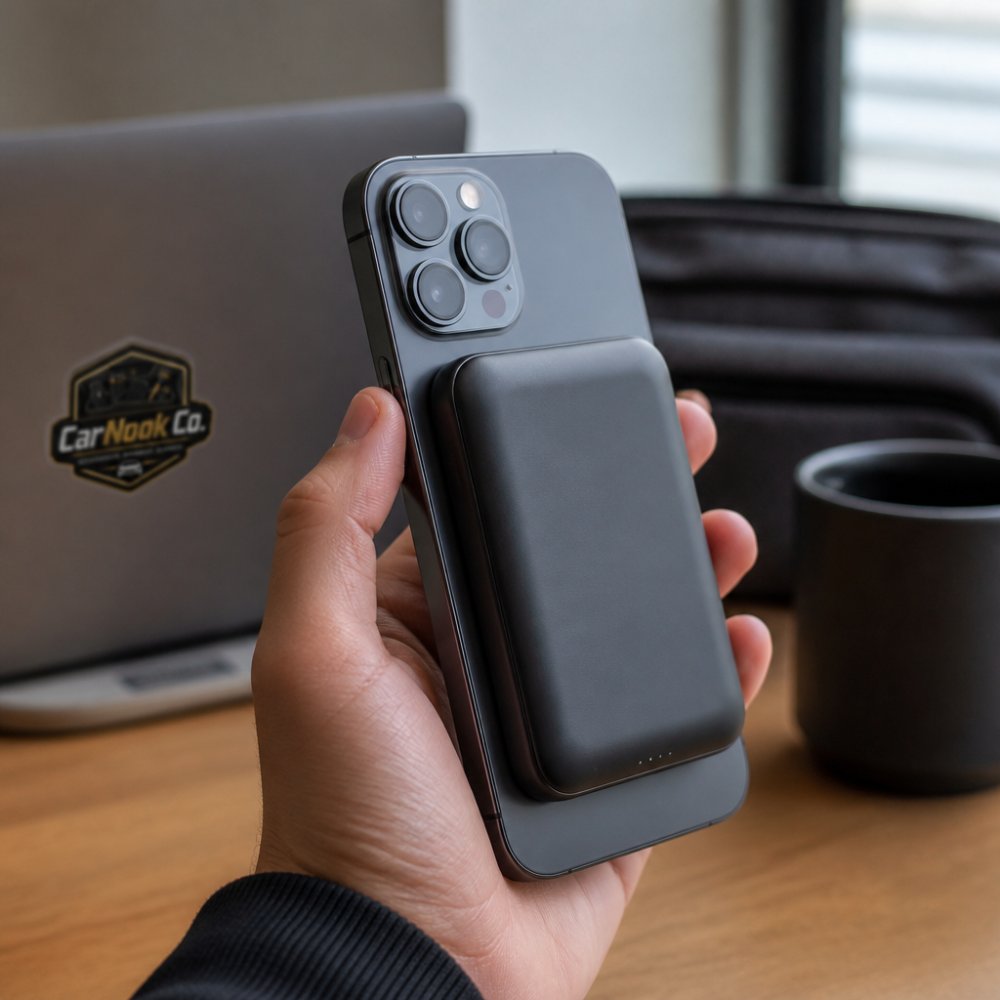
Charging interruptions can occur if the magnetic connection shifts during movement. A jostled phone or aggressive handling may disrupt alignment, pausing charging until contact is restored, frustrating users who expect seamless, continuous power delivery.
The capacity of most MagSafe battery packs falls below that of traditional power banks. Many models deliver only one full phone charge, sometimes less. Users expecting multiple full charges may find themselves disappointed.
Magnetic compatibility remains inconsistent across devices. What works well with one phone model might perform poorly with another, so some research is necessary before purchasing.
The price-to-capacity ratio often favors traditional wired power banks. MagSafe battery packs typically cost more per mAh of storage than comparable non-magnetic alternatives, so buyers are paying a premium for convenience.
Magnetic attachment can interfere with certain phone features. Some payment systems, RFID cards stored near the phone, or sensitive medical devices may experience disruption from the magnetic field. The intensity varies by model.
Wired power banks connect to your phone via USB-C, Lightning, or Micro-USB cables. They typically deliver faster charging speeds than wireless MagSafe alternatives, generate less heat, and maintain consistent power delivery throughout the charging cycle.
The trade-off involves portability and convenience. Wired power banks require cable management and deliberate connection steps. You can't simply attach and continue using your phone hands-free while charging.
MagSafe battery packs prioritize ease of use over raw charging speed. The magnetic attachment eliminates cables and simplifies the charging experience. This convenience appeals to users who value seamless integration into daily routines.
Battery capacity typically favors wired power banks. Traditional designs can accommodate larger battery cells, delivering multiple full phone charges. MagSafe battery packs, constrained by size and weight considerations, usually offer more modest capacity.
Cost considerations cut both ways. Wired power banks often cost less per unit of storage capacity. However, MagSafe battery packs command premium pricing for their specialized design and magnetic functionality.
The choice depends on your priorities. Frequent travelers who value lightweight portability might prefer MagSafe despite lower capacity. Power users who need extended charging sessions and maximum speed would benefit more from a wired power bank.
Consider your typical usage patterns first. Do you charge your phone daily, or need backup power for extended trips? Daily commuters with reliable outlet access benefit differently from road trippers who spend days away from power sources.
Evaluate your device ecosystem. If you own multiple phones or tablets, check which devices support MagSafe or magnetic charging. A MagSafe battery pack serves you best if most of your devices are compatible.
Think about your hands-free needs. If you frequently navigate using GPS, take video calls, or use your phone while charging, the magnetic attachment of a MagSafe battery pack adds genuine value. If you charge primarily while your phone sits on a desk, this advantage disappears.
Assess your budget and capacity requirements. Calculate how many full charges you realistically need between outlets. If one charge suffices, a compact MagSafe battery pack works well; if you need multiple charges, a larger wired power bank becomes more practical.
Consider your environment. Hot climates may make wireless charging less efficient due to heat management concerns. Humid or wet environments might favor wired power banks with fewer exposed charging contacts.
Your personal preferences matter too. If you prefer minimal, cable-free setups, MagSafe battery packs align with that philosophy. If you prioritize function over form, traditional power banks offer better value.
MagSafe battery packs deliver genuine convenience for users who value hands-free charging and compact portability. They excel at keeping your phone charged during daily commutes, providing backup power for short trips, and eliminating cable clutter. However, they sacrifice charging speed and capacity compared to traditional wired power banks, and compatibility varies across devices.
The best choice depends on your actual needs rather than marketing appeal, and weighing the MagSafe battery pack pros and cons against your lifestyle will guide you to the right decision. If you own a compatible device, use your phone hands-free often, and don't need multiple full charges between outlets, a MagSafe battery pack justifies its premium pricing. If you prioritize maximum speed, large capacity, or multi-device compatibility, a traditional wired power bank serves you better.
CarNook Co. carries MagSafe-compatible accessories and phone cases designed to work seamlessly with magnetic battery packs. Explore our collection of MagSafe Accessories and Phone Cases to find options that complement your device and lifestyle. The right accessories make all the difference in creating a setup that works smoothly for your daily routine.
No. MagSafe battery packs typically deliver slower charging speeds than wired power banks because wireless charging is inherently less efficient. A wired connection transfers power more directly, while MagSafe relies on magnetic alignment and wireless power transfer, which generates more heat and converts less energy into usable charge. If charging speed is your priority, a wired power bank will top up your iPhone faster.
MagSafe battery packs are designed to last, though battery capacity gradually decreases over time like all lithium-ion batteries. Lifespan depends on usage patterns, charging cycles, heat exposure, and how often you fully drain and recharge the pack. Following manufacturer guidance on storage and avoiding extreme temperatures can help extend durability.
MagSafe battery packs work best with iPhones that have built-in MagSafe support, starting with iPhone 12 and newer models. Older iPhones without MagSafe can still charge via wireless charging, but they won't attach magnetically, so the pack won't stay aligned. If you use a thick case or a case without MagSafe compatibility, the magnetic grip may weaken or fail entirely, so check case compatibility before purchasing.
MagSafe battery packs can generate heat during wireless charging, which is normal. However, excessive heat over extended periods can affect battery health and longevity. Modern MagSafe packs include thermal protection to prevent overheating, but they won't damage your iPhone's battery if used as intended. Avoid using your phone while charging wirelessly, and don't cover the pack or phone during charging to allow heat to dissipate.

