



Table of Contents
- Why Your Commute Needs MagSafe Accessories
- Quick Comparison: Top Picks for Commuters
- CarNook™ DashGrip Phone Mount: Best Dashboard Option for Daily Drivers
- CarNook™ MagClip Phone Holder: A Secure Magnetic Mount for Stability
- Do Magnetic Car Mounts Damage Phone Batteries?
- How to Choose the Right MagSafe Accessories for Daily Commute
- Conclusion: Build Your Commuter Kit
- Frequently Asked Questions
Last Updated: September 9, 2026
Why Your Commute Needs MagSafe Accessories
The daily commute is where phones get dropped, batteries drain, and drivers fumble with cords at red lights. MagSafe accessories for daily commute solve these friction points by combining secure attachment with wireless charging and one-handed access. For anyone who drives, rides transit, or walks to work, a magnetic accessory setup turns a phone into a hands-free tool instead of a distraction.
MagSafe is Apple's magnetic alignment system built into recent iPhone models. It snaps accessories into perfect position every time, which means no more guessing whether your phone is centered on a charging puck. The ecosystem now includes mounts, wallets, power banks, and cases that all attach with the same satisfying click.
This guide from CarNook Co. focuses on commuter-specific needs: stability on bumpy roads, quick transitions between car and train, and keeping cards and phone together without a bulky bag. The best setup for daily drivers differs from what works for transit riders, so the picks below are organized around how you actually travel.
Quick Comparison: Top Picks for Commuters
The right MagSafe accessory depends on your commute style. Drivers need dashboard or vent mounting with a strong magnetic hold. Transit riders need hands-free carrying that works while standing on a crowded train. Everyone needs protection for the phone itself.
Accessory |
Best For |
Key Feature |
Price |
|---|---|---|---|
Daily drivers |
Compact dashboard design |
$24.99 |
|
Stability seekers |
Strong magnetic hold |
$27.00 |
|
All-in-one carry |
Built-in card storage |
$29.99 |
|
CarNook™ ZipCarry Crossbody Phone Case |
Transit riders |
Zipper pocket + strap |
$34.99 |
Quick Picks:

- Best for Drivers: CarNook™ DashGrip Phone Mount, keeps navigation visible without dashboard clutter
- Best for Stability: CarNook™ MagClip Phone Holder, strong magnetic hold for rough roads
- Best for Minimalists: CarNook™ MagSafe Wallet Phone Case, phone protection and card storage in one
- Best for Transit: CarNook™ ZipCarry Crossbody Phone Case, hands-free with secure zipper storage
CarNook™ DashGrip Phone Mount: Best Dashboard Option for Daily Drivers
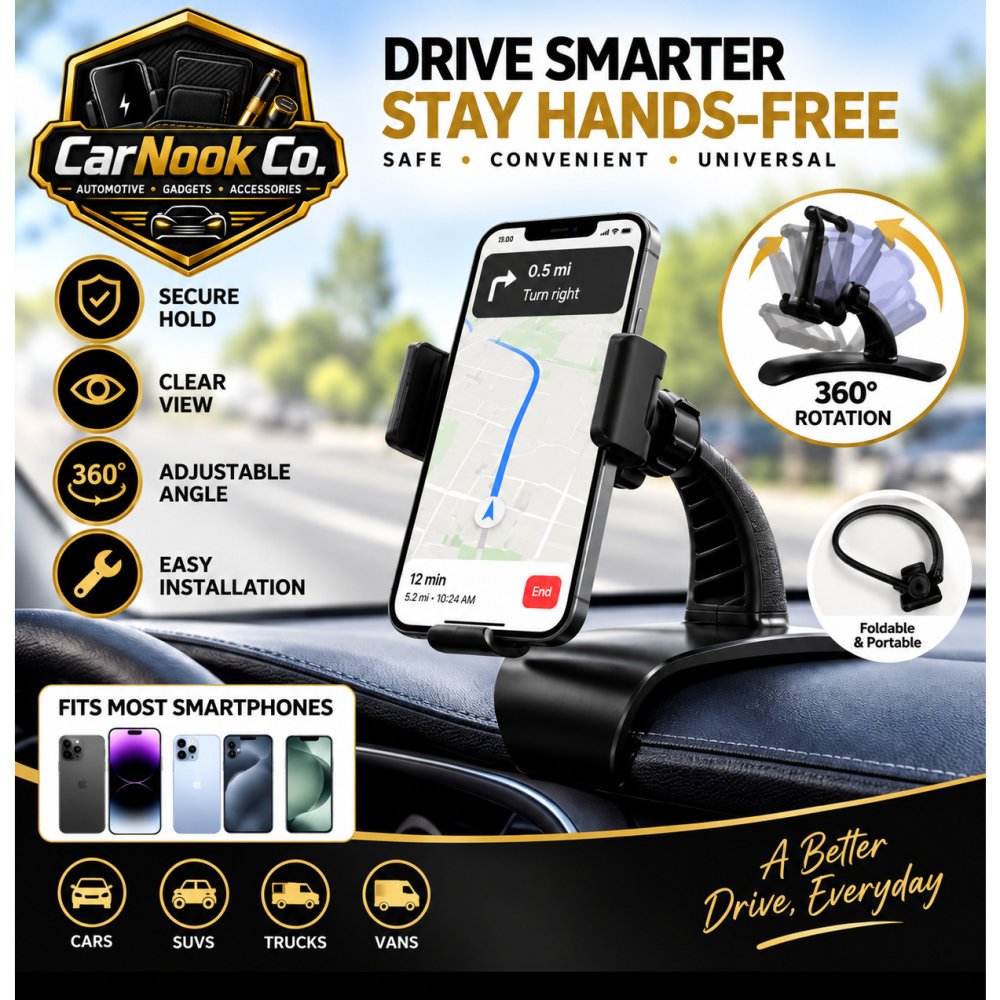
The CarNook™ DashGrip Phone Mount is the top pick for commuters who drive daily and need navigation within easy sight. Its compact dashboard-mounted design keeps the phone visible without blocking the windshield or crowding the cabin. The adjustable viewing angle lets drivers position the screen to reduce glare and keep eyes closer to the road.
A common problem with budget mounts is slippage on hot days or rough pavement. The DashGrip addresses this with a design that helps keep the phone secure while driving, and it requires no power or charging to operate. Installation is lightweight and straightforward, making it simple to move between vehicles if you share a car or switch commutes seasonally.
What stands out in practice: the foldable design helps keep the dashboard organized when the mount is not in use. The mount works with many smartphone sizes, so it is not locked to one device generation.
CarNook™ MagClip Phone Holder: A Secure Magnetic Mount for Stability
Drivers who hit rough roads or highway bumps need a mount that holds firm through every transition. The CarNook™ MagClip Phone Holder delivers that stability with a strong magnetic hold and a compact, low-profile design built from ABS and silicone.

The MagClip is designed for convenient in-car use, keeping the phone stable and visible for navigation, music, calls, and everyday driving. Its key advantage over dashboard mounts is the easy one-hand attachment and removal.
Magnetic interference and safety are common concerns with magnetic phone mounts. The MagClip is designed to keep the phone secure during normal driving while allowing quick one-hand attachment and removal. Strong magnets can sometimes affect compass readings temporarily, depending on placement and the phone model, so proper positioning matters. The lightweight design also makes the mount easy to move between a personal car and a work vehicle.
Do Magnetic Car Mounts Damage Phone Batteries?
A frequent worry for daily commuters is whether the magnets in their new mount will harm their phone's battery. The short answer is no. The static magnets used in MagSafe-style mounts do not generate the heat or electrical current that degrades lithium-ion batteries. Battery health is primarily affected by heat and charge cycles, not by magnetic fields. So, a non-charging magnetic mount generally does not pose a direct risk to your phone’s battery.
The concern becomes more nuanced when you introduce wireless charging. A magnetic mount that also charges will generate some heat. If you use a wireless charging mount, choosing a Qi-certified charger can provide added confidence that it has been tested to meet established wireless charging standards. A common pattern among commuters is to use a non-charging magnetic mount for quick trips and rely on a wired cable for a fast, cool top-up at their desk, which is often the most battery-friendly approach.
However, card safety is a separate consideration. Magnetic-stripe cards, such as some hotel keys, transit passes, and older payment cards, can be affected by strong magnets if they are kept too close for extended periods. RFID and contactless cards work differently and are not demagnetized in the same way. To be safe, keep magnetic-stripe cards slightly separated from strong magnetic accessories, especially inside wallets or phone cases with built-in magnets.

Finally, think about the long-term wear and tear on your phone's internal compass. While the magnets in a mount are strong, they are not strong enough to permanently damage the phone's magnetometer. However, a very strong magnetic field can temporarily interfere with compass accuracy, which affects navigation apps. If you notice your maps app pointing you in the wrong direction, it's often just a temporary glitch. A quick fix is to move your phone away from the mount and wave it in a figure-eight motion to recalibrate the compass. This is a minor, easily correctable quirk, not a sign of permanent damage.
How to Choose the Right MagSafe Accessories for Daily Commute
Choosing the right MagSafe accessories for daily commute comes down to more than just picking a mount. The best setup is built around your specific travel pattern and how you transition between environments. The goal is to create a seamless system that minimizes fumbling and keeps your essentials within reach, whether you're driving, on a train, or walking.
Consider your commute style first. Daily drivers benefit most from a dashboard or magnetic mount that keeps navigation visible. Transit riders need hands-free carrying options like crossbody cases or lanyards that survive crowded trains and stairs. Walkers and cyclists should prioritize secure attachment and drop protection over dashboard compatibility.
Assess what you carry. A phone plus a few cards calls for a magnetic wallet or wallet case. Phone, cards, keys, and earbuds point toward a crossbody case with zipper storage. The goal is fewer bags and pockets to manage, not more accessories to track.
Think about charging habits. Commuters who drain battery on long drives should look for mounts that support wireless charging. Those with short commutes may prefer a lightweight non-charging mount and charge at a desk. Magnetic strength matters most for stability, while battery capacity matters for portable power banks.
Match accessories to your phone case. MagSafe accessories work best with compatible phones and cases. A magnetic wallet or mount attaches securely to a phone with built-in magnets or a case designed for magnetic alignment. Thick or non-magnetic cases can weaken the hold and interfere with wireless charging.
Plan for the transition, not just the ride. The most overlooked part of a commute is the transition, getting out of the car, walking to the platform, or switching from a bike to a desk. A mount that is easy to detach with one hand is critical. A phone that is securely mounted in the car should be just as easy to grab and slip into a crossbody bag or a pocket as you step out. If your commute involves multiple modes, a universal mounting plate on your car's vent and a crossbody case for the rest of the trip can be a more flexible setup than a single, permanent dashboard mount.
Consideration |
Drivers |
Transit Riders |
Walkers/Cyclists |
|---|---|---|---|
Primary need |
Navigation visibility |
Hands-free carrying |
Drop protection |
Best accessory |
Dashboard or vent mount |
Crossbody case or lanyard |
Secure case + lanyard |
Charging need |
Wireless mount optional |
Power bank for long days |
Minimal, charge at destination |
Key risk |
Mount slippage |
Phone theft or drops |
Accidental drops |
Transition strategy |
One-hand release for quick exit |
Easy access for tap-to-pay |
Strap management to prevent swinging |
Conclusion: Build Your Commuter Kit
Building a commuter kit does not require buying every magnetic accessory on the market. Start with the one that solves your biggest daily friction: a secure mount for drivers, a crossbody case for transit riders, or a wallet case for anyone tired of carrying a separate card holder. Add pieces only when they replace something you already juggle.
CarNook Co. designs accessories that combine functionality, convenience, and modern design for real everyday use. The CarNook™ MagSafe Wallet Phone Case works as an all-in-one phone and card carrier, while the CarNook™ DashGrip Phone Mount and CarNook™ MagClip Phone Holder keep navigation secure on the road. Transit riders can explore the CarNook™ ZipCarry Crossbody Phone Case for hands-free carrying.
Get started with CarNook Co. and build a commuter setup that keeps your phone secure, charged, and within reach from the first mile to the last.
Frequently Asked Questions
Is it okay to use MagSafe every day?
Yes. MagSafe accessories are designed for regular everyday use with compatible devices. Apple’s MagSafe technology uses magnets to help compatible accessories align properly with supported iPhone models. When using wireless charging, heat can affect battery health over time, so it’s best to use compatible, properly designed charging accessories and avoid excessive heat. For daily commutes, a compatible magnetic car mount or wallet can provide convenient access to your phone.
Do magnetic car mounts damage phone batteries?
No, magnetic car mounts do not damage phone batteries. The magnets in MagSafe mounts are static and do not emit the kind of electromagnetic field that affects battery chemistry. The main concern with car mounts is heat. If you use a wireless charging mount, direct sunlight and prolonged charging can raise battery temperature. Using a passive magnetic mount for navigation, like the CarNook™ MagClip, avoids heat buildup entirely.
What are the most useful MagSafe accessories for commuters?
The most useful MagSafe accessories for a daily commute are a secure car mount, a slim magnetic wallet, and a hands-free carrying option. A stable mount keeps your phone visible for GPS. A magnetic wallet, such as the CarNook™ MagPocket, holds a transit card or ID so you don't need a separate purse. For those who switch between driving and walking, a crossbody case or lanyard keeps your phone accessible.
Can MagSafe accessories interfere with credit cards in a wallet?
Yes, strong magnets can demagnetize the magnetic stripe on older credit cards or hotel keys. However, most modern credit cards use EMV chips or contactless payment, which are not affected by magnets. To be safe, avoid storing cards with magnetic stripes directly against the magnet in a MagSafe wallet. RFID-blocking sleeves offer extra protection if you carry multiple cards.
Are MagSafe accessories compatible with all phone cases?
No. MagSafe accessories require a phone or case with the built-in magnetic ring for a secure attachment. If you have an older phone or a non-MagSafe case, the accessory will not snap on properly. You can buy magnetic adhesive rings to add compatibility to standard cases, but a case designed for MagSafe, like the CarNook™ MagStand Phone Case, offers the strongest hold and proper alignment.