



Table of Contents
- Why Buy a Magnetic Car Phone Mount Online in 2026
- Quick Comparison: CarNook Magnetic Mounts at a Glance
- MagSafe Car Mount Compatibility: What Your Phone and Case Need
- Magnet Types Compared: N52 vs. Standard Magnets
- Mounting Styles: Dashboard, Vent, and Windshield Options
- How to Install a Magnetic Phone Mount (Step by Step)
- Phone Mount Placement for Safe Driving
- Wireless Charging, NFC, and Heavy-Duty Case Compatibility
- Adhesive Residue and Dashboard Damage: What to Know Before You Buy
- Frequently Asked Questions
Last Updated: September 10, 2026
Why Buy a Magnetic Car Phone Mount Online in 2026
Shopping for a magnetic car phone mount online gives drivers access to a wider range of magnet grades, mounting styles, and case-compatible designs than most brick-and-mortar auto aisles stock. That matters because the mount you pick determines whether your phone stays put on a rough highway or slides free at the worst moment. This guide from CarNook Co. breaks down magnet types, mounting surfaces, installation, and the compatibility questions buyers ask most.

Below, you'll find a step-by-step installation walkthrough, a magnet comparison table, and the two issues most buying guides skip entirely: adhesive residue and wireless charging interference.
Magnetic mounting works because a steel plate or magnet array inside or behind your case bonds to a magnet in the mount head. The strength of that bond depends on three things: magnet grade, plate size, and how much material sits between them. Get all three right and the phone stays planted. Get one wrong and you're reattaching your phone at every red light.
A quick word on price before the details. CarNook Co. sells its magnetic mounts directly online, which is why this guide focuses on what to check before you buy rather than which store to visit.
Quick Comparison: CarNook Magnetic Mounts at a Glance
CarNook Co. offers three mounts built around different driving and riding situations. Each uses a one-time purchase model with no subscription or app required.
Product |
Price |
Mount Type |
Best For |
Key Feature |
|---|---|---|---|---|
$27.00 |
Magnetic clip holder |
Everyday in-car navigation |
Strong magnetic hold, one-hand attachment |
|
$24.99 |
Dashboard mount |
Clean dashboard setups |
Foldable design, adjustable viewing angle |
|
$29.99 |
Handlebar mount |
Bikes, e-bikes, scooters |
Aluminum alloy body, fits bars up to 31.8 mm |
The MagClip suits drivers who want the simplest possible setup. The DashGrip trades a bit of magnet simplicity for a foldable, low-clutter dashboard footprint. The SecureRide steps outside the car entirely and uses a mechanical clamp rather than magnets, which is worth knowing if you split time between a car and a bike.

MagSafe Car Mount Compatibility: What Your Phone and Case Need
MagSafe car mount compatibility comes down to whether your phone has a built-in magnet array or whether you add a metal plate. iPhones from the 12 series onward include MagSafe magnets inside the phone itself. Most Android phones do not, so they need an adhesive metal plate or a magnetic case.
Here's the part most buyers get wrong: the case matters as much as the phone. A thick case, a wallet case, or a case with a metal kickstand can weaken the magnetic connection enough that the phone shifts on bumps. If you already own a case you like, check its thickness before ordering a mount. Thin cases under roughly 2 mm generally pass the magnetic field through cleanly. Heavy-duty or multi-layer cases often need a plate mounted on the outside of the case rather than between the case and phone.
A simple test: place your phone in its case, hold a fridge magnet against the back, and feel the pull. Weak pull means you'll want an external plate.
Magnet Types Compared: N52 vs. Standard Magnets
N52 magnets are the strongest grade commonly used in phone mounts, and the grade number directly affects how much weight the mount can hold. Magnet grades run from N35 up to N52, with higher numbers meaning stronger magnetic attraction for the same physical size.
Magnet Grade |
Relative Strength |
Typical Use |
Trade-off |
|---|---|---|---|
N35 |
Baseline |
Budget mounts, light phones |
Loses grip on rough roads |
N42 |
Moderate |
Mid-range mounts |
Adequate for small phones |
N52 |
Strongest common grade |
Premium mounts, larger phones |
Costs more, can affect magnetic strips |
What most guides miss is that grade alone doesn't guarantee a secure hold. A large N42 array can outperform a small N52 magnet because surface area matters. When comparing mounts, look for both the grade and the size of the magnet or magnet ring.
Strong magnets can interfere with magnetically encoded cards and may affect certain implanted medical devices when brought too close. Keep magnetic mounts and accessories away from hotel key cards and other magnetic-stripe cards, and follow the medical-device manufacturer’s recommended separation distance if you use an implanted device such as a pacemaker or defibrillator.
Mounting Styles: Dashboard, Vent, and Windshield Options
Every magnetic mount starts with a base, and the base decides where the mount can live and how long it stays put. The three common bases are adhesive dashboard pads, vent clips, and suction cups. Each one fails for a different reason, so the right pick depends on your dashboard material, your climate, and how often you move the mount between vehicles.
Adhesive dashboard mounts use pressure-sensitive adhesive (often a 3M-style VHB or acrylic foam tape) that bonds to flat or gently curved plastic. The bond is strongest on smooth, non-porous surfaces and weakest on soft-touch vinyl, textured dashboards, and surfaces treated with protectant spray. Adhesive mounts sit closest to your natural sightline and avoid blocking air vents. The CarNook™ DashGrip Phone Mount uses a compact dashboard-mounted design with an adjustable viewing angle and a foldable body, so it tucks away when not in use.

Vent clips slide onto a horizontal vent blade and rely on the vent's own structure for support. Install takes seconds and no adhesive touches your dash, which matters if you lease or plan to resell. The trade-offs are real: vent blades flex, so the mount can rattle on rough pavement, and the phone can block airflow from that vent. Heavier phones tend to sag the blade over time.
Windshield suction mounts use a rubber or silicone cup pressed against glass with a locking lever. They offer the widest positioning range, but suction cups lose grip in extreme heat and need periodic re-seating. Direct summer sun on the glass is the usual culprit.
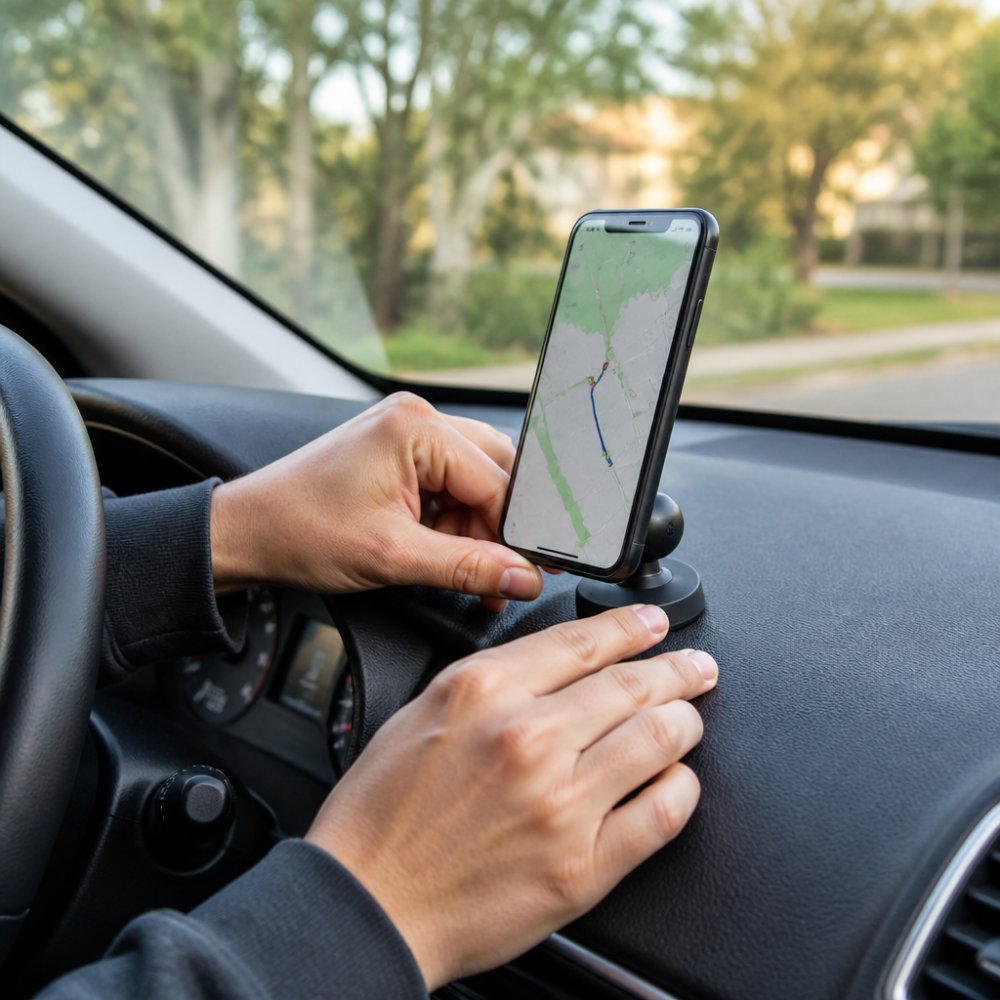
Here is how the three compare on the factors that actually decide whether a mount stays put:
Base Type |
Best Surface |
Main Failure Mode |
Removable Without Residue? |
|---|---|---|---|
Adhesive dashboard pad |
Smooth, flat plastic |
Heat softens adhesive over time |
Usually, with warming and a plastic card |
Vent clip |
Horizontal vent blade |
Rattle and blade sag on rough roads |
Yes, no adhesive involved |
Windshield suction |
Clean glass |
Loses suction in heat |
Yes, but cup may need re-wetting |
A few practical notes that most product pages skip:
- Dashboard curvature matters more than dashboard size. A pad rated for a flat surface will peel at the edges on a deeply curved dash. Hold a straightedge against your dash before ordering.
- Dashboard protectant is adhesive's enemy. If you use a vinyl or plastic dressing, clean the mounting spot with isopropyl alcohol and let it dry fully before applying the pad.
- Vent clips and vertical vents don't mix. Most clips are designed for horizontal blades; on vertical vents they twist and lose grip.
- Suction cups like clean, cool glass. Wipe the glass, press the cup, and lock the lever. If it pops off in summer, re-clean and try again before assuming the cup is defective.
For most drivers, an adhesive dashboard mount hits the best balance of stability and sightline. If you rotate between vehicles or want zero commitment to the dash, a vent clip is the safer default.
How to Install a Magnetic Phone Mount (Step by Step)
Installation takes about five minutes for a dashboard or vent mount. The steps below apply to most magnetic mounts, including the CarNook™ MagClip Phone Holder.
What you'll need:
- The mount and its adhesive or clip base
- An alcohol wipe or clean cloth
- A metal plate if your phone lacks built-in magnets
- Your phone and case
Step 1: Clean the mounting surface. Wipe the dashboard or vent area with alcohol and let it dry completely. Adhesive bonds poorly to dust and dashboard protectant film.
Step 2: Test-fit the position. Hold the mount where you plan to place it and check that it doesn't block your view of the road or your vents.
Step 3: Attach the base. Peel the adhesive backing and press firmly for 30 seconds. For vent mounts, slide the clip onto a firm vent blade.
Step 4: Wait before loading. Give adhesive 24 hours to cure before hanging your phone, especially in warm weather.
Step 5: Add the plate or align MagSafe. Place the metal plate on the back of your case, or simply bring a MagSafe phone near the mount head.
Step 6: Attach and adjust. Snap the phone on, then rotate the swivel head to your preferred angle.
Expected result: the phone holds firmly with no sag when you tap the screen.
Phone Mount Placement for Safe Driving
Phone mount placement for safe driving means keeping the device within a quick glance and out of the airbag deployment zone. A mount positioned low on the center console or directly in front of the steering wheel forces longer glances away from the road, and a mount placed over an airbag panel can turn the phone into a projectile in a crash.
Here are the placement rules that matter most:
- Keep the phone within a brief glance. Aim for a spot where you can read navigation with a quick eye movement, not a head turn. If you have to tilt your head or look down past the wheel, the mount is too low.
- Stay out of the airbag path. Never place a mount or phone over the steering wheel airbag panel or in front of a passenger-side airbag. Airbags deploy at high speed and anything in their path becomes a hazard.
- Avoid the primary sightline. Windshield mounts should sit low and toward the center of the glass, not high in your forward view. A mount that blocks your view of the road or mirrors is a problem regardless of how convenient it is.
- Mind the controls. A mount that covers a hazard button, climate control, or the center screen creates a new distraction every time you need one of those controls.
A useful test: sit in your normal driving position, then reach for the phone as if you were tapping a navigation prompt. If your hand has to cross your body, reach past the wheel, or move more than a short distance from the wheel, the mount is in the wrong spot.
The National Highway Traffic Safety Administration guidance on driver distraction notes that visual-manual tasks take a driver's eyes off the road for measurable stretches, which is why glance time matters more than mount aesthetics. The shorter the glance, the better, and a well-placed mount is what makes a short glance possible.
Laws for windshield-mounted phone holders vary by state, including where a mount may be positioned and how much of the driver’s view it may obstruct. Check your state and local requirements before installing a windshield mount. Dashboard and vent mounts may also be subject to rules concerning visibility, distracted driving, and safe placement.
A few placement habits that reduce risk over time:
- Set your route before you drive. Adjust the phone, enter the destination, and confirm the volume while parked. Once you're moving, the mount should only need a glance, not a tap.
- Use voice for anything longer than a tap. Voice commands and hands-free calling keep your hands on the wheel and your eyes up.
- Re-check the angle after a passenger adjusts the seat or vents. Small changes to the cabin can shift what you can see.
Wireless Charging, NFC, and Heavy-Duty Case Compatibility
Wireless charging and NFC compatibility depends on the phone, case, mount design, and placement of any metal plate. A metal plate positioned over the wireless charging coil can interfere with charging, while poorly placed metal can also affect NFC performance. If you use wireless charging, choose a MagSafe-compatible setup or position any added metal plate away from the charging area.
On compatible iPhones, MagSafe is designed so the magnet ring aligns around the wireless charging area, but charging still depends on using a MagSafe-compatible charger or mount. On Android phones, the exact locations of the wireless charging coil and NFC antenna vary by model, so there is no single plate position that works for every device. Check your phone manufacturer’s guidance before placing a metal plate if you plan to use wireless charging or NFC.
Heavy-duty cases present the other challenge. Thick rubber and multi-layer cases absorb magnetic force, so a plate mounted between the case and phone may barely hold. Mount the plate on the outside of the case instead, or choose a case designed with a built-in magnet array.
Adhesive Residue and Dashboard Damage: What to Know Before You Buy
Adhesive residue is the most common complaint after a mount is removed, and it's largely preventable. Most mounts use pressure-sensitive adhesive that releases more cleanly when warmed slightly before removal.
Work a plastic card under the base, apply gentle steady pressure, and avoid yanking. Residual sticky patches usually lift with rubbing alcohol or a dedicated adhesive remover. On soft-touch or vinyl dashboards, test any solvent on a hidden area first, since some cleaners dull the finish.
Heat is the other long-term risk. Prolonged sun exposure softens adhesive and can leave marks on textured plastic. Parking in shade or using a sunshade reduces the effect. If you lease your vehicle or plan to resell it, a vent or clip-style mount avoids adhesive on the dash altogether.
When you're ready to compare options, the Federal Trade Commission's guidance on online shopping and returns is a useful reminder to check return policies before buying accessories online.
Choosing the right magnetic car phone mount comes down to matching magnet strength, case thickness, and mounting surface to how you actually drive. Get that combination right and your phone stays put through highway bumps, summer heat, and daily commutes. CarNook Co. builds mounts around exactly those everyday conditions, from the compact CarNook™ MagClip Phone Holder with its one-hand attachment to the foldable CarNook™ DashGrip Phone Mount and the aluminum-bodied CarNook™ SecureRide Phone Mount for two-wheel riders. Explore the CarNook Co. collection and find the mount that fits your routine.
Frequently Asked Questions
Which magnetic car phone mount is the best?
The best magnetic car phone mount depends on where you want it and what phone you carry. A dashboard mount like the CarNook DashGrip ($24.99) suits everyday commuters who want a low-profile setup. If you prefer one-hand attachment, the CarNook MagClip Phone Holder ($27.00) uses a strong magnetic hold with a compact footprint. For bikes, e-bikes, or scooters, the CarNook SecureRide Phone Mount ($29.99) uses aluminum alloy construction and fits phones roughly 55-100 mm wide.
Are magnetic car mounts safe for phone batteries and internal components?
Yes. The magnets in a magnetic car phone mount sit outside the phone and do not touch the battery or internal electronics. Modern smartphones use solid-state storage, so there is no spinning drive for a magnet to affect. Phones also have their own internal magnets for features like MagSafe, and a mount magnet simply pairs with them. The bigger practical risk is heat from direct sun, so park in shade when you can.
Do I need a special case to use a magnetic car phone mount?
Not always. If you own a MagSafe-compatible iPhone or a MagSafe case, the mount attaches directly with no extra hardware. For other phones, most mounts include a thin metal plate you place between the phone and the case, or stick to the case's back. Thick heavy-duty cases can weaken the magnetic attraction, so test the hold before driving. CarNook mounts work with compatible magnetic phones and cases.
How do I ensure a magnetic mount stays secure on my dashboard?
Clean the mounting surface with an alcohol wipe and let it dry fully before applying adhesive. Press the mount down for 30 seconds and wait 24 hours before attaching your phone, which lets the adhesive cure. Avoid textured or curved dash areas. In summer heat, park in shade when possible. A suction cup or vent clip base can be a better fit if your dashboard has a matte, porous finish that adhesive struggles to grip.
What is the difference between standard magnetic mounts and MagSafe-compatible mounts?
Standard magnetic mounts use a metal plate you attach to your phone or case, then rely on a generic magnet to hold it. MagSafe-compatible mounts align with the ring of magnets built into iPhone 12 and newer models, so they snap into place without a plate and can pass through wireless charging on compatible accessories. If you own an older phone or an Android device, a standard magnetic mount is usually the simpler choice.