


⚡ Free Express Shipping in USA✦
🔥 Newest Arrival Collection Live Now✦
✨ SUBSCRIBE TO GET YOUR 10% Off✦

Last Updated: October 30, 2026
Quick Summary
The best phone stand for watching videos in bed holds your phone at eye level without you holding it, and the right type depends on where you watch. Choose a wearable neck holder, a solid wood nightstand stand, a case with a built-in ring stand, a magnetic wallet stand, or a gooseneck clamp for lying flat.
The best phone stand for watching videos in bed is the one that holds your phone at eye level without asking you to hold it yourself. That sounds simple. It rarely is. A nightstand, a headboard, and a mattress all behave differently, and a holder that works on a desk often fails beside a pillow.
This guide from CarNook covers four setups built for in-bed viewing, plus the buying criteria that separate a holder you keep from one that ends up in a drawer.
Stability comes first. A bed phone mount has to survive a mattress shift, a blanket tug, and a cat landing on the nightstand.
Reach matters just as much. A flexible arm should put the screen within comfortable viewing distance without forcing you to stretch. Height adjustment and arm length decide whether a holder works while you sit up or lie back.
Viewing angle is the third piece. An adjustable mount lets you tilt the phone toward your face rather than propping it at a fixed slant. If you cannot change the angle, you will change your posture instead, and your neck will notice.
Your existing case may or may not work with a holder. Clamp and clip designs grip the phone body, so compatibility depends on the holder and the case, and a thick wallet case can reduce the grip a clamp gets.
Magnetic holders need a compatible phone or case. If you are unsure whether yours qualifies, learn how to tell if your phone case is MagSafe compatible with simple at-home tests and visual checks. Magnetic accessories are designed for compatible magnetic phones and cases, so check the listing for the models and case types it supports.
Charging is the other half. A holder that blocks the charging port forces a choice between watching and topping up. Cable routing matters too: a stand that sits flush against a nightstand can trap the cable behind it.
Each option below solves a different problem, so match the setup to how you actually watch.
| Setup | Price | Mount Type | Best For | Charging Access |
|---|---|---|---|---|
| FreeView Neck Holder | $24.99 | Wearable neck holder | Watching anywhere, not just in bed | Open, phone stays free |
| WoodDock Stand | $24.99 | Solid wood desktop stand | Nightstand and desk viewing | Open port access |
| MagStand Case | $34.99 | Built-in ring stand | One-device simplicity | Ports and charging accessible |
| MagWallet | $44.99 | Magnetic wallet with foldable stand | Carrying cards and propping the phone | Ports and charging accessible |
The FreeView is a wearable option that rests around your neck and holds the phone in front of you, so it does not need a nightstand or bed frame.
That flexibility is the point. A bedside phone stand is tied to one spot; a wearable holder follows you from the bed to the couch to the kitchen. The flexible neck design can be positioned for viewing, and the holder is designed for many smartphone sizes.
Pros: lightweight and easy to carry, useful for recipes, video calls, and watching videos. Cons: it is a wearable, so it may suit lounging better than lying flat on your back.
Best for: people who watch in several places and want one holder instead of three. Skip if: you want the phone to stay put on a nightstand while you move around.
Readers who want the full details can shop the FreeView neck phone holder.

Not everyone wants an arm reaching over the pillow. The WoodDock takes the opposite approach: a solid wood stand that keeps the phone upright on the nightstand, ready to grab.
It is compact, lightweight, and designed for most smartphones, and it is made from solid wood. That matters if you dislike clutter beside the bed.
The trade-off is obvious. A fixed stand sits at one height, so you adjust your position rather than the mount. For watching movies in bed while propped on pillows, that is usually fine. For lying flat, it is not.
Best for: nightstands, desks, and anyone who wants a clean bedside surface. Skip if: you need the screen to come to you.
See the WoodDock wooden phone stand for finish and sizing details.
The simplest holder is the one already attached to your phone. The MagStand case has a built-in ring stand that props the phone up for hands-free viewing, and supports both vertical and horizontal viewing.
That covers the two ways people watch in bed: scrolling short videos upright, then flipping sideways for a movie. Raised edges protect the camera and screen, and the slim profile keeps the case comfortable in hand when you are not using the stand.
A ring stand needs a surface to lean against or rest on.
Best for: travelers and minimalists who want one case doing two jobs. Skip if: you want the phone suspended above the mattress.
The MagStand protective phone case lists the models it fits.

Two problems, one accessory. The MagWallet attaches magnetically to compatible phones and cases, stores cards, and folds into a stand for hands-free viewing.
CarNook™ FreeView Hands-Free Wearable Neck Phone Holder →
The foldable stand can be used for hands-free viewing. Pop it open for a video, fold it flat for the night. The magnetic attachment is designed for compatible magnetic phones and cases.
Pros: includes card storage and a stand, with a slim, compact design. Cons: it needs a compatible magnetic phone or case to attach securely.
Best for: people who carry cards on their phone and want a stand that travels. Skip if: your phone or case is not magnetic-compatible.
The MagWallet magnetic phone wallet shows the card storage and stand layout.

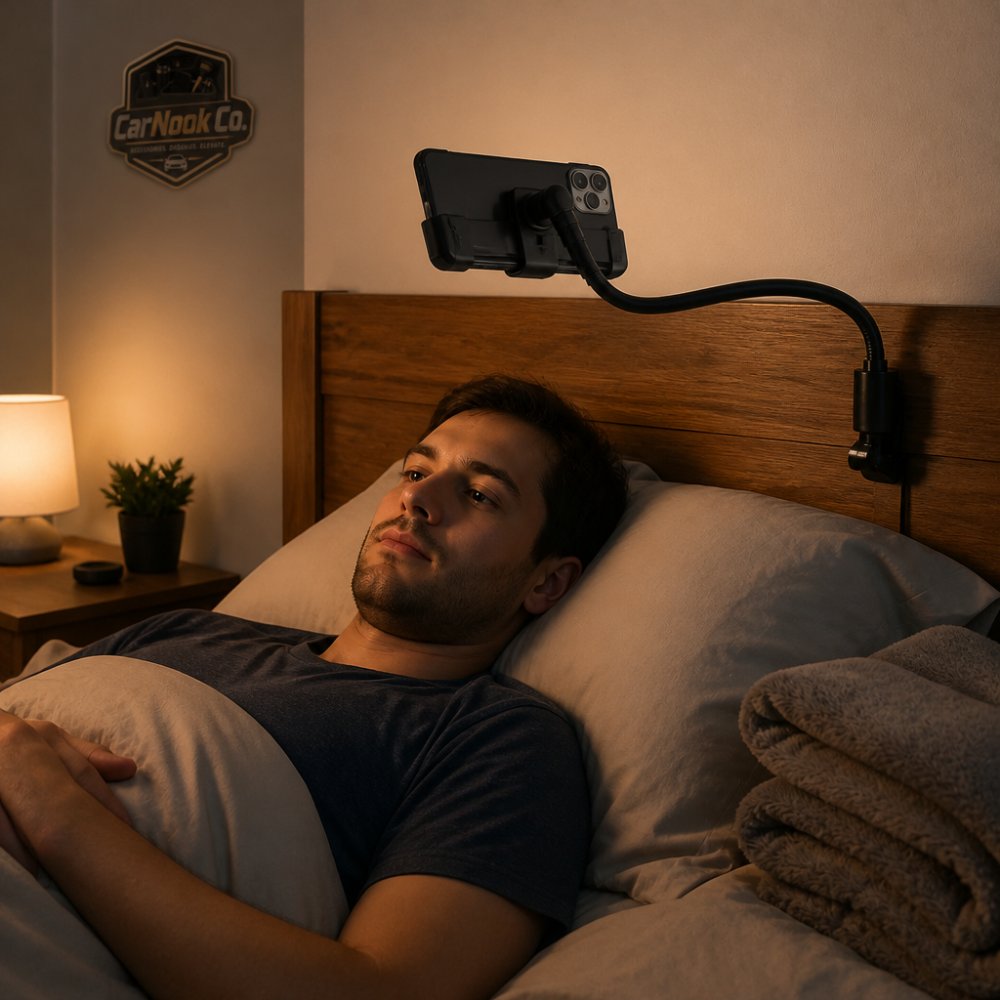
A gooseneck phone holder for bed earns its place when the phone has to hover above you rather than sit beside you. These holders clamp to a bed frame, headboard, or nearby shelf and use a flexible arm to bring the screen over the mattress.
That setup suits lying flat on your back, and it keeps the phone off the mattress where a blanket can bury it. It also frees your hands completely, which matters for longer movies and for anyone who has dropped a phone on their face mid-episode.
The catch is fit. A gooseneck only works if three things line up: the clamp has something solid to grab, the arm can reach your viewing position, and the joints can hold the phone's weight without sagging. Get any one wrong and the holder becomes a nuisance.
Measure the rail, board, or shelf you plan to clamp to, then compare it to the clamp's stated opening range. A headboard slat, a metal bed rail, and a thick wooden board are very different targets. Thin slats can slip; very thick boards can exceed the jaw. Look for a clamp with padded jaws so it grips without marring the finish, and confirm the clamp can close on your specific surface rather than assuming it will.
A flexible arm is measured in length, but usable reach is shorter once the arm bends. Position yourself where you actually watch, then estimate the distance from your clamp point to the space above your chest or lap. Leave room for the phone's height and a little clearance so the screen is not crowding your face. If the arm is too short, you will end up stretching or shifting down the bed.
A long flexible arm can wobble, especially when it is extended far or holding a heavier phone. If the arm sags overnight, the phone drifts out of view. A clamp that shifts when the mattress moves is a sign the mount point is not solid enough.
If you want one holder for the bed, the desk, and the kitchen, a wearable or a folding stand covers more ground. For a fixed bedside setup where the phone needs to hover, though, a well-fitted gooseneck is hard to beat.
The real reason to buy a holder is your neck. Holding a phone at chest height for an hour tilts your head forward, and that position gets uncomfortable fast. A holder fixes the geometry by putting the screen where your eyes already want to look.
Start with height. Raise the screen toward eye level so you are looking roughly straight ahead rather than down at your lap. Then adjust the angle so the screen faces you squarely. A slight tilt toward your face is usually more comfortable than a steep downward slant, because it lets your head stay neutral instead of dropping forward.
Viewing distance matters too. A screen that is too close can make you hold tension in your shoulders and eyes; one that is too far invites you to lean in. Aim for a distance where you can read text without squinting and without craning forward.
Small adjustments help more than big ones. A pillow behind your shoulders can keep you from sliding down the headboard. A pillow under your knees can take pressure off your lower back. The goal is a position you can hold for a full episode without constantly shifting.
If you watch on your side, a holder that keeps the phone at a slight angle toward your face can be easier on your neck than propping the phone flat on the mattress. If you lie on your back, a gooseneck arm that hovers the screen overhead keeps you from tilting your chin down toward your chest.
Two habits are worth building. First, set the angle before you settle in, not after your neck starts complaining. Second, alternate positions during long sessions.
None of this replaces listening to your body. If a position starts to ache, change it. A holder is there to reduce the effort of watching, not to lock you into one pose for hours.
Match the holder to your bed, not to a spec sheet. Use this checklist:
Answer those seven and the choice narrows quickly. A nightstand viewer wants the WoodDock. A traveler wants the MagStand case or MagWallet. Someone who watches in every room wants the FreeView. Someone who lies flat needs a gooseneck clamp.
CarNook offers a wearable holder for hands-free viewing, a solid wood stand, a case with a built-in stand, and a magnetic wallet with a foldable stand. If your watching habits follow you out of the bedroom, it is also worth browsing the wider range of phone stands and holders to find a setup that works at a desk or on the couch too.
There is no single answer for every sleeper. A compact stand like the CarNook WoodDock suits people who watch on a nightstand and want the phone upright and easy to see. A wearable holder such as the CarNook FreeView keeps the screen in front of you without a nightstand. A case with a built-in ring stand works if you prefer to hold the phone or prop it on a pillow. Match the stand to where you actually watch, how far away the phone sits, and whether you need the screen angled toward your face.
The trade-offs are stability and reach: a long, heavily bent arm can wobble, and the clamp needs a surface thick enough to grip. Check that the arm length and clamp fit your bed before buying.
Steadiness comes down to support and surface. If you use a clamp-style holder, tighten it to a solid bed frame or headboard rather than bedding. Keep the flexible arm as short and as straight as your viewing position allows, since a long, sharply bent arm tends to sway. A case with a built-in ring stand also gives the phone a stable prop point on a firm surface.
Start with where the phone will sit. For nightstand viewing, look for a stand that holds the phone upright at an adjustable angle, like the CarNook WoodDock. For viewing while lying down, a flexible holder or wearable neck holder keeps the screen in front of you. Check that the holder fits your phone size and works with your case, and confirm you can still reach the charging port.
It depends on the stand and the case. Check the CarNook WoodDock listing for the phone sizes it is designed for. Magnetic accessories such as the CarNook MagWallet are designed for compatible magnetic phones and cases, so a thick or non-magnetic case may reduce grip. A case with a built-in stand, like the CarNook MagStand, replaces the need for a separate holder. Check the product listing for the phone models and case types each item supports.
The hard part is not finding a holder. It is admitting that the phone propped on a pillow is the reason your neck aches by episode three. CarNook Co. makes the fix simple with the FreeView neck holder for hands-free viewing anywhere, the WoodDock solid wood stand for a tidy nightstand, and the MagStand case with a built-in ring stand for one-device simplicity. Get started with CarNook and turn your bed into a comfortable place to watch, not a place to strain.


