


⚡ Free Express Shipping in USA✦
🔥 Newest Arrival Collection Live Now✦
✨ SUBSCRIBE TO GET YOUR 10% Off✦

Last Updated: October 4, 2026
Shopping for MagSafe car mounts for iPhone 16 Pro means answering one question first: does the mount hold the phone, or does it also charge it? Those are two separate promises, and confusing them is the most common mistake buyers make. This guide from CarNook Co. walks through the fit, holding force, charging specs, and mounting options that actually decide whether a mount works in daily driving.
The iPhone 16 Pro adds a wrinkle that older guides ignore. Its camera plateau is larger than previous generations, and that raised section changes how a phone sits against a flat mounting surface.
Below, we'll cover exactly how to check compatibility before buying, how to test holding force in a parking lot in under five minutes, and which mounting location suits which dashboard.
A raised camera plateau means the back of the phone is not flat. When a phone with a pronounced camera bump rests against a mount, the bump can act as a pivot point.
That matters for two things:
Before buying, check that the mount's contact surface is wide enough to clear the camera plateau, and that the mount does not press against the lens area. A mount designed around a flat-backed phone may not seat the same way on the iPhone 16 Pro.
Magnetic attachment is the ability of a mount to hold the phone in place using magnets alone. Magnetic charging is the ability to pass power through that same magnetic connection into the phone's charging coil.
A mount can do the first without doing the second. Many magnetic holders are passive: they grip the phone and nothing more. Others include a charging head and require a cable and a USB power adapter to deliver power.
Apple's own MagSafe technology overview documents how the magnetic array and charging coil align on compatible iPhones, which is worth reading before assuming any magnetic mount will charge your phone.
The practical takeaway: if charging matters to you, look for a mount that explicitly states wireless charging support. If it only says "magnetic," assume it holds but does not charge.
Vent mounts clip into an air vent and hold the phone close to the driver. Dashboard mounts sit on or attach to the dashboard surface and typically place the phone lower or further from reach. Windshield mounts use a suction cup and can place the phone higher. The right pick depends less on the mount category than on what your specific vehicle gives you to work with.
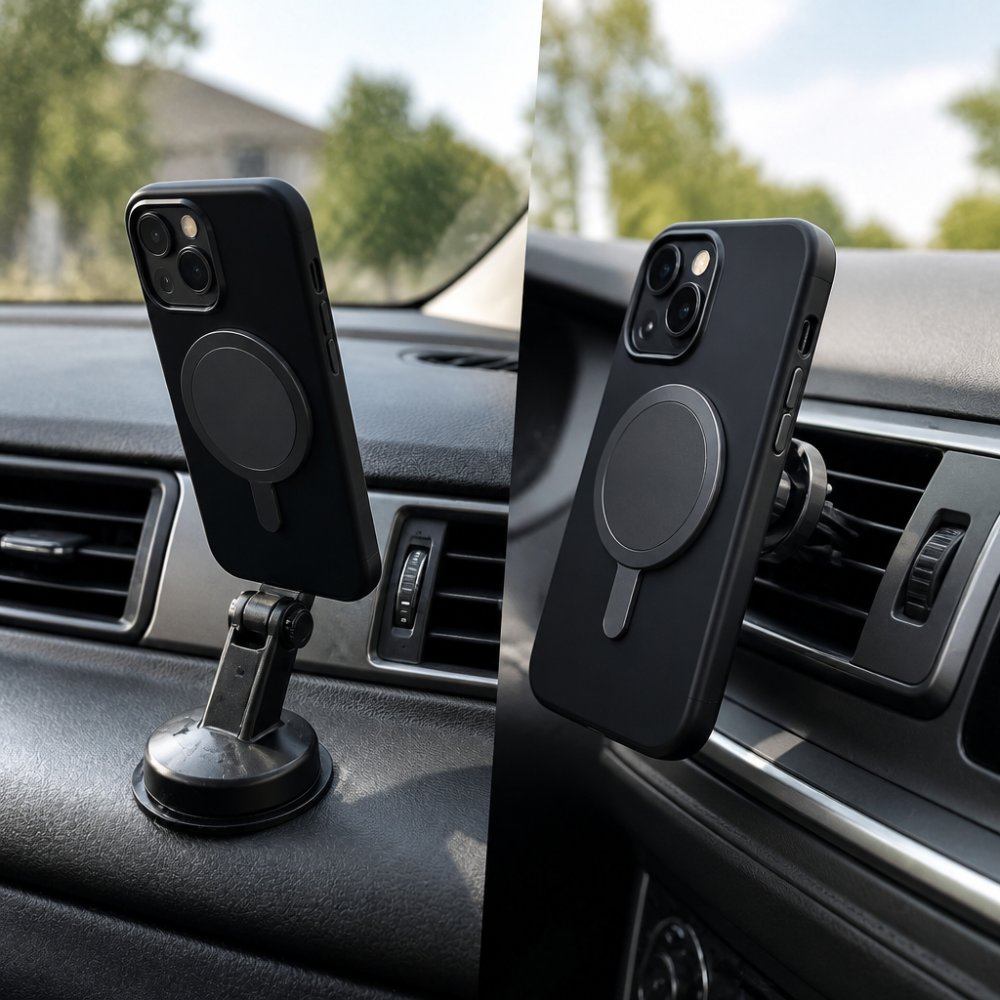
Vent slats vary a lot between vehicles, and that variation decides whether a vent mount holds. Things to look at on your own car:
A common mistake is ordering a vent mount without checking the slat design first. Walk out to your car and look at the vent before buying.
Dashboard mounts avoid vent interference, but the dashboard itself becomes the variable:
If your dash is curved, textured, or padded, a vent mount or a windshield mount may be the more practical starting point, but check the vent and windshield notes below before deciding.
A windshield mount can place the phone higher and closer to the driver's line of sight, but two things decide whether it works for you:
Adhesive and suction bases are not universal. They tend to be a poor fit when:
When in doubt, follow the mount manufacturer's surface-preparation instructions rather than a general rule, since requirements vary by product.
Before ordering, note these four things about your car:
Matching the mount to those four answers does more for daily usability than any single spec on the box.
A MagSafe car mount for iPhone with case depends entirely on the case. Magnets pass through some materials well and struggle with others.
Here is what generally affects magnetic performance through a case:
If you already own a case you like, test it before buying a mount. Hold a magnet or a magnetic accessory against the back of the cased phone and feel how strongly it pulls. If the pull feels weak, a magnetic mount may not hold reliably.
CarNook Co. carries phone cases that can work with magnetic accessories, which removes some of the guesswork if you are starting fresh.
A MagSafe-compatible car mount with wireless charging adds power delivery to the magnetic hold. The specs on the box tell you what you are actually getting, but only if you know which claims to separate.
Product listings often use "MagSafe" loosely. In practice, a mount can fall into one of three buckets:
If a listing says "MagSafe" without qualifying it, treat the claim as unverified until the spec sheet confirms which bucket the product is in. Apple's own MagSafe technology overview documents how the magnetic array and charging coil align on compatible iPhones, which is worth reading before assuming any magnetic mount will charge your phone.
CarNook™ DashGrip Phone Mount →
| Spec | What to Look For | Why It Matters |
|---|---|---|
| Charging claim | "MagSafe certified," "wireless charging," or "magnetic only" | Tells you whether the mount charges at all, and whether the MagSafe name is verified |
| Charging output | Stated wattage (for example, 15W) | Sets an upper bound on how fast the phone can charge |
| Power source | Required USB power adapter rating | An underpowered adapter can slow or stop charging |
| Alignment | Magnet array position | Misalignment can reduce charging efficiency |
| Cable and adapter included | Whether they ship with the mount | Many mounts require a separate adapter to hit their rated output |
Charging speed is not set by the mount alone. The power adapter, the cable, the phone's own charging behavior, and the phone's temperature all play a role. A mount rated for fast charging will not deliver that speed if it is plugged into a low-output adapter, and a phone that is warm from navigation or direct sun may charge more slowly regardless of the mount.
The Qi wireless charging standard documentation explains how alignment and power transfer interact, which helps explain why a phone that is slightly off-center may charge slowly or not at all.
The iPhone 16 Pro's camera plateau sits near the top of the back panel, and the magnetic array sits below it. On a charging mount, that layout matters in two ways:
If you are buying a charging mount, confirm that the mount's contact surface clears the camera plateau and that your case is designed to work with magnetic accessories.
No. Magnetic car mounts do not damage phone batteries through magnetism itself. The concern usually comes from mixing up two different things: magnets and heat.
Magnets hold the phone. They do not push current into the battery. The charging coil handles power transfer, and that process is the same whether the phone is on a magnetic mount or a wired charger.
What can affect battery health over time:
The practical fix is simple: avoid leaving a charging phone in direct sunlight, and give the phone airflow. If your dashboard gets very hot in summer, a vent mount may keep the phone cooler than a dash mount.
Test the mount before you rely on it at highway speed. The process takes a few minutes and a parking space.
If the phone rotates or slides during step four, the mount or the case is not a good match. Do not assume it will improve at higher speeds.
Heat is the quiet enemy of any car mount. Dashboards can reach high temperatures in summer sun, and adhesives, suction cups, and plastic components all respond to that heat over time.
What tends to wear out first:
To extend a mount's life, keep it out of direct sun when parked where possible, clean the mounting surface before installing an adhesive or suction mount, and follow the manufacturer's instructions for surface preparation. Requirements vary by product, so the included instructions are the right reference rather than a general rule.
CarNook Co.'s MagSafe accessories are designed for everyday in-car use, and the CarNook™ MagClip Phone Holder uses a compact magnetic design with one-hand attachment and removal.

Where you put the mount affects both safety and how cluttered your car feels.
State laws on phone placement and use while driving vary, so check your own state's rules before deciding on a position. As a general principle, the phone should not block your view of the road or mirrors.
For a cleaner interior:
A foldable design helps here. The CarNook™ DashGrip Phone Mount is a compact dashboard holder with an adjustable viewing angle and a foldable design that helps keep the dashboard organized when the phone is not mounted. It is a non-charging holder, so it suits drivers who want a secure spot for navigation and calls without adding a power cable.

For drivers who want a magnetic hold, the CarNook™ MagClip Phone Holder offers one-hand attachment and removal with a low-profile design.
The hard part of choosing MagSafe car mounts for iPhone 16 Pro is not finding options. It is separating the hold from the charge, checking camera clearance, and confirming your case works with magnets before you buy.
CarNook Co. stocks car phone mounts and magnetic accessories designed for everyday driving, including the foldable DashGrip Phone Mount and the low-profile MagClip Phone Holder, both built to keep your phone secure and within view.
Get started with CarNook Co. and find a mount that fits your car, your case, and the way you actually drive.
It depends on the case. A MagSafe-compatible case has a built-in magnet ring that lines up with the phone's magnets and the mount's magnets, which keeps the hold consistent. Thick cases, wallet cases, and metal-backed cases can weaken the magnetic connection or block wireless charging. If you already have a case you like, check whether the maker lists it as MagSafe-compatible before buying a magnetic car mount.
Some can, but attachment and charging are separate features. A mount with a magnetic connection only holds the phone, while a wireless charging mount also passes power through a charging head. For charging to work, the mount needs a compatible USB power adapter and cable, and the phone must sit aligned on the charging coil. Charging speed can vary by mount, adapter, and case, so check the listed power output before assuming fast charging.
Magnets themselves do not drain or damage a phone battery. The bigger factors are heat and charging behavior. Wireless charging generates warmth, and a phone that runs hot while charging on a dashboard in direct sun can see charging slow or pause. Using a mount with ventilation around the phone, following the manufacturer's instructions, and avoiding constant direct sun exposure can help keep temperatures in a normal range.
Check four things: whether your case is MagSafe-compatible, where the mount attaches (vent, dashboard, or windshield), whether you want charging or attachment only, and how adjustable the arm and angle are. Also confirm the mount works with your phone size and camera layout, and that any charging model includes or specifies the cable and power adapter it needs.

