



Table of Contents
- Mount Types at a Glance: The 2026 Comparison Table
- Dashboard vs Vent Phone Mount: Which Placement Fits Your Car
- Magnetic vs Tension Clamp Mechanisms
- MagSafe Car Mount Compatibility: Cases, Magnets, and Charging
- How to Install a Car Phone Mount Without Damaging Your Interior
- Stability, Vibration Dampening, and One-Handed Operation
- Adjustability: Ball Joints, Telescopic Arms, and Viewing Angle
- Wireless Charging Integration and Cable Management
- Long-Term Care: Adhesive Pads, Suction Cups, and Hot Weather
- Vehicle-Specific Compatibility: Vents, Curves, and Textured Dashes
- Phone Battery Health and Magnetic Mounts
- Legal Restrictions and Distracted Driving Rules
- What to Ignore: Mount Shopping Myths That Cost You Money
- Matching the Mount to Your Driving Routine
- Conclusion: Picking the Right Phone Mount for 2026
- Frequently Asked Questions
Last Updated: September 23, 2026
Mount Types at a Glance: The 2026 Comparison Table
Choosing a phone mount starts with the mount type, because the type determines where it sits, how it holds, and how long it lasts. Learning how to choose phone mount hardware in 2026 means matching the mechanism to the vehicle first, then to the phone. This guide from CarNook Co. walks through every decision point, from dashboard versus vent placement to magnetic versus clamp grip, so the right choice becomes obvious before any money changes hands.

Mount Type |
Best For |
Main Trade-Off |
|---|---|---|
Dashboard |
Flat, reachable surfaces |
Adhesive and heat exposure |
Air vent |
Quick install, no residue |
Clip fit and airflow |
Windshield |
Long reach, easy removal |
Visibility and suction wear |
Cup holder |
Trucks and older dashboards |
Fixed low position |
Magnetic |
One-handed docking |
Needs a compatible case |
Tension clamp |
Any phone, any case |
Two-handed insertion |
Dashboard vs Vent Phone Mount: Which Placement Fits Your Car
Dashboard placement wins for drivers who want the phone low and close to the wheel, while vent placement wins for drivers who want zero adhesive and instant installation. The right answer depends less on preference and more on the surface the car actually offers.
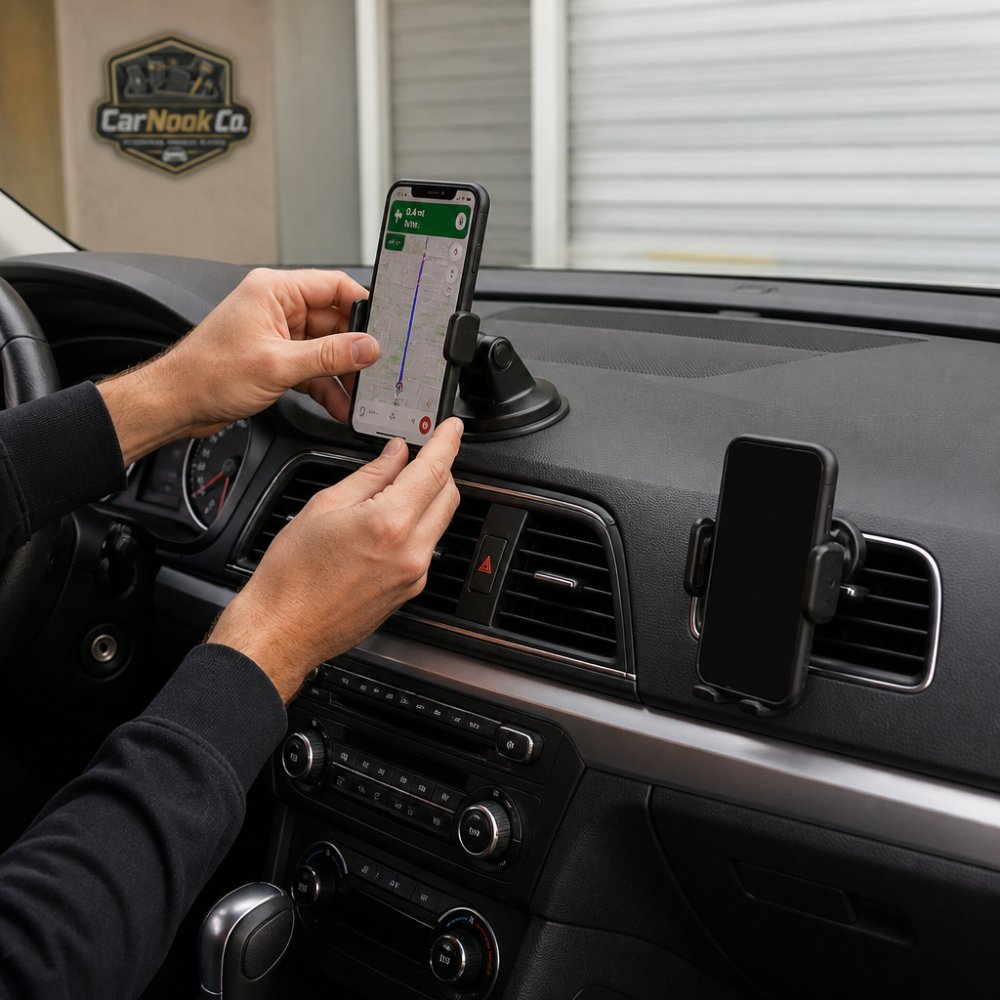
Dashboard Mounts: Surface, Adhesive, and Heat
A dashboard mount relies on a flat or gently curved surface to bond or rest against. Adhesive pads grip best on smooth plastic and vinyl, and they struggle on textured or porous materials where only part of the pad makes contact. Heat is the quiet enemy here. A dashboard in direct sun reaches temperatures that soften many adhesives, which is why placement away from the windshield's direct beam extends a pad's working life considerably.
Vent Mounts: Clip Fit and Airflow Trade-Offs
Vent mounts clip onto the horizontal slats of an air vent, which makes them tool-free and removable in seconds. The catch is two-fold. First, slat thickness and spacing vary between vehicles, so a clip that feels solid in one car can wobble in another. Second, blocking a vent reduces airflow, and running heat through that vent pushes warm air directly at the phone.
Magnetic vs Tension Clamp Mechanisms
Magnetic mounts and tension clamps solve the same problem in opposite ways: magnets prioritize speed, clamps prioritize security across every phone. Magnetic holders use a magnet array that snaps to a metal plate or a magnetic phone back, which makes one-handed operation genuinely possible. Tension clamps use spring-loaded arms or a locking mechanism that grips the phone's sides, which works with any phone and any case but usually requires two hands to insert.
- Magnetic: fastest docking, cleanest look, needs a compatible phone or case
- Tension clamp: universal fit, strongest grip, slower to load and unload
- Hybrid: magnetic head on an adjustable arm, a common middle ground
MagSafe Car Mount Compatibility: Cases, Magnets, and Charging
MagSafe car mount compatibility comes down to one question: does the phone or case have a magnet array strong enough to hold the phone's weight through road vibration? Phones with built-in magnets align automatically. Everything else needs either a magnetic case or an adhesive metal ring applied to the case back.
Do You Need a MagSafe Case?
For drivers who want a clean dashboard and fast docking, the CarNook™ MagClip Phone Holder uses a strong magnetic hold in a compact, low-profile body, with one-hand attachment and removal for navigation, music, and hands-free calls. It works with compatible magnetic phones and cases, which makes checking case compatibility the first step.

How to Install a Car Phone Mount Without Damaging Your Interior
Installation is where good mounts get ruined, and it is also where most guides stop at "clean the surface and press." The steps below go further: they cover how to test-fit a specific vehicle before committing, how each adhesive and suction mechanism actually bonds, and how to remove a mount later without lifting dashboard finish. Each step exists to protect either the car or the bond.
Step 1: Measure the surface before you buy anything
Skip this and every later step is wasted effort. Three measurements decide whether a mount will work in your specific vehicle:
- Vent slat depth and spacing. Slide a ruler or a stiff card between two horizontal slats. Most vent clips need roughly 3-6 mm of slat thickness to bite, and slats spaced wider than about 15 mm apart let the clip rock. Vertical or circular vents accept very few clip designs at all.
- Dashboard flat area. Lay a straightedge across the spot you want to use. If you can see daylight under the middle of the straightedge, the surface is domed and an adhesive pad will only contact at the high point. Look for a flat patch at least as wide as the mount's base plate.
- Surface texture. Run a fingernail across the dash. Smooth plastic and vinyl accept adhesive; soft-touch coatings, textured grain, and porous materials do not, because the pad only touches the peaks of the texture.
Step 2: Clean and prep the bonding surface
- Wipe the mounting area with an alcohol wipe and let it dry completely. Dust, sunscreen residue, and dashboard dressing are the top reasons adhesive pads fail early, dressing in particular leaves a silicone film that no adhesive will bond through.
- If the dash has been treated with a protectant recently, clean it twice. The first wipe lifts the film; the second reaches the plastic.
- For suction cups, wipe the cup itself with warm soapy water, rinse, and air-dry. Finger oils on the cup lip are the most common cause of a slow seal leak.
Step 3: Test-fit before removing any backing
Hold the mount in position with the phone loaded and check three things: the phone does not block your view of the road through the windshield, the mount does not sit over an airbag deployment zone, and the phone's screen is reachable with a glance rather than a head turn. Do this with the backing still on, once adhesive touches a textured surface, repositioning weakens it.
Step 4: Bond the mount correctly
- Adhesive pads: Warm the pad briefly with a hair dryer on low if the ambient temperature is cold; adhesive flows and grips better on a slightly warm surface. Press and hold for a full 30 seconds, then wait before loading the phone, many pads need time to reach full strength, and loading early is what causes the slow slide that shows up a week later.
- Suction cups: Press the cup down and flip the lever or twist the collar to evacuate air. A cup that holds for an hour then releases is usually leaking at the lip, not failing at the lever.
Step 5: Route the cable and tighten every joint
Route the charging cable behind trim or along the dash seam so it does not cross the wheel, pedals, or gear lever. Then load the phone, set the viewing angle, and tighten every ball joint and arm connection. Loose joints are the second-most-common cause of a mount that "won't stop vibrating."
Stability, Vibration Dampening, and One-Handed Operation
Stability is the difference between a mount that earns its place and one that ends up in a drawer. Three factors drive it: the stiffness of the arm, the quality of the joint, and how well the grip matches the phone's weight.
Adjustability: Ball Joints, Telescopic Arms, and Viewing Angle
Adjustability determines whether a mount fits a specific driver or just fits the car. A ball joint allows rotation in nearly any direction, which handles portrait versus landscape orientation and fine-tunes the viewing angle. A telescopic arm extends the phone closer to the driver or pushes it away from the windshield, which matters in vehicles with deep dashboards or long reaches.
Wireless Charging Integration and Cable Management
Wireless charging turns a mount into a charging station, which removes the cable from the equation entirely. Qi wireless charging mounts hold the phone and charge it at the same time, provided the phone's charging coil lines up with the mount's coil. Thick cases, metal plates, and misaligned magnetic rings all interfere with that alignment and can slow or stop charging altogether.
Long-Term Care: Adhesive Pads, Suction Cups, and Hot Weather
Adhesive pads and suction cups are consumables, not permanent fixtures, and treating them that way prevents most failures. Regular maintenance can help adhesive pads and suction cups maintain their grip, especially during hot weather. This section covers how each mechanism actually holds, how to restore one that is slipping, and how mount placement affects the phone's battery over time.
How each mechanism holds, and how it fails
A suction cup holds by removing the air between the cup and the surface, so any dust, oil, or texture breaks the seal. A cup that slowly releases over hours is leaking at the lip; a cup that pops off instantly was never sealed to begin with. Adhesive pads bond chemically, and heat gradually degrades that bond, which is why a pad that grips in spring can slide by midsummer.
Restoring a suction cup that has lost its grip
- Peel the cup off and wash it in warm soapy water. This removes the invisible film of skin oil and dust that causes most slow leaks.
- Rinse and air-dry completely, do not towel-dry, since lint on the lip defeats the seal.
- If the cup has hardened or developed a permanent dent from sitting compressed, a brief dip in hot (not boiling) water can soften the rubber enough to let it re-form its shape.
- Reattach to a clean, smooth surface and press firmly before flipping the lever.
A cup that still will not hold after this is genuinely worn out and should be replaced rather than coaxed.
CarNook™ DashGrip Phone Mount →
Reviving and replacing adhesive pads
- Follow the adhesive manufacturer’s installation and curing instructions, including any recommended pressure or waiting period before mounting the phone.
- If the pad is lifting at the edges, warm it with a hair dryer on low and press it back down while warm. This re-flows the adhesive and buys time.
- Replace the pad when it shows hardening, curling edges, or a shiny, glossy surface, a shiny pad has lost its tack and will not recover.
- Replacement adhesive pads are inexpensive and widely available; keeping a spare means a failed pad is a two-minute fix rather than a reason to buy a new mount.
Hot-weather strategy
A dashboard in direct sun reaches temperatures that soften many adhesives and stress suction seals. Park with a sunshade, or position the mount out of the windshield's direct beam during hot months. A mount that suddenly fails in August usually gave warnings in June, checking the pad's edges and the cup's seal monthly takes seconds and prevents the phone from meeting the floor mat at a red light.
Mount placement and phone battery health
Magnetic mounts do not damage phone batteries, a magnet strong enough to hold a phone through road vibration has no meaningful effect on the battery itself. What does affect long-term battery health is heat, and mount placement is a heat decision:
- A mount in direct sun raises the phone's temperature, and charging a hot phone is harder on the battery than charging a cool one.
- A vent mount that blocks a heater vent pushes warm air directly at the device during winter, comfortable for you, hard on the phone.
- A wireless charging mount that is misaligned with the phone's coil makes the charging system work harder, which generates more heat than a properly aligned charge.
Vehicle-Specific Compatibility: Vents, Curves, and Textured Dashes
Vehicle-specific compatibility is an important factor that can determine whether a phone mount fits securely and functions as intended. Three vehicle traits decide which mounts will work:
- Vent design: horizontal slats accept most clips; vertical or circular vents accept very few
- Dashboard shape: deeply curved or domed dashes leave almost no flat bonding area
- Surface texture: soft-touch coatings and textured plastics resist adhesive pads
Phone Battery Health and Magnetic Mounts
Magnetic mounts do not damage phone batteries, but heat and charging behavior can affect long-term battery health. A magnet strong enough to hold a phone through road vibration has no meaningful effect on the battery itself. What does affect battery health is heat, and a mount that places the phone in direct sun or in front of a heater vent raises its temperature during charging.
Legal Restrictions and Distracted Driving Rules
Handheld phone use while driving is restricted in most states, and the rules vary enough that drivers should check their own state's statute rather than assume. Many states prohibit holding a phone while driving and permit only hands-free operation, which is exactly what a mount provides. Laws on phone-mount placement vary by state, so check local requirements and position the mount where it does not unnecessarily obstruct your view of the road.
What to Ignore: Mount Shopping Myths That Cost You Money
Several persistent myths push buyers toward the wrong product. The most expensive mount is not automatically the most stable; a well-matched simple mount often outperforms a complex one. "Universal fit" does not mean it fits every vehicle, only that it fits many phones. A stronger magnet is not always better, since excessive force makes removal awkward and can interfere with magnetic accessories.
Matching the Mount to Your Driving Routine
The best mount is the one that matches how the phone actually gets used, so start with the routine and work backward. A daily commuter who runs navigation and music needs fast docking and a stable viewing angle. A rideshare or delivery driver who mounts and unmounts constantly needs a magnetic holder and a case that supports it. A road tripper needs something that travels well and adapts to rental cars.
Routine |
Priority |
Mount Type |
|---|---|---|
Daily commute |
Fast docking, stable angle |
Magnetic dashboard |
Rideshare or delivery |
Constant mount and unmount |
Magnetic with compatible case |
Road trips |
Portability, rental-car fit |
Vent clip or suction |
Two-wheel riding |
Vibration resistance |
Aluminum handlebar mount |
Desk and travel |
Viewing angle, portability |
Compact stand |
Conclusion: Picking the Right Phone Mount for 2026
The hardest part of choosing a phone mount is not the shopping, it is resisting the urge to buy before checking the car. Vent slat style, dashboard flatness, case thickness, and charging needs each eliminate options, and confirming those four details first turns a confusing market into a short list. Buyers who match the mount to the vehicle and the routine, rather than to the product photo, end up with a mount that stays put.

Frequently Asked Questions
What is the most secure type of car phone mount?
Security depends on your dash surface and driving conditions. Dashboard mounts with a wide adhesive pad hold well on flat, smooth surfaces, while tension clamp mounts grip the phone itself so it cannot slide. Magnetic mounts with a strong attachment keep the phone steady but depend on a compatible case or magnet plate. For rough roads, look for a mount with a locking mechanism and a short, rigid arm rather than a long flexible one.
Are magnetic phone mounts safe for smartphones?
Yes. Magnets do not erase data or damage modern smartphones, and they do not harm the battery. The bigger risk is a weak hold: a heavy phone on a small magnet can shift on bumps. Use a mount rated for your phone size, attach the metal plate or magnetic ring as directed, and check the grip before you rely on it for hands-free navigation.
How do I know if a phone mount will fit my car's dashboard?
Check three things before buying: the mounting surface (flat and smooth holds best; textured or curved dashes need a different base), clearance for your phone (make sure the screen does not block driver visibility or touch climate controls), and heat exposure (direct sun weakens adhesive over time). A short test placement with painter's tape can show you where the mount will actually sit.
Is a vent mount or a windshield mount better?
Vent mounts keep the phone close to the driver and out of the windshield line of sight, but they can block airflow and may not fit every vent style. Windshield suction mounts offer adjustable viewing angle and easy removal, but suction can fail in hot weather and some states restrict items mounted on the windshield. Pick based on your vent design, climate, and local rules.
Do MagSafe mounts work with all phone cases?
No. MagSafe car mount compatibility requires a case with a built-in magnetic ring or a phone with MagSafe built in. Thick or non-magnetic cases weaken the hold. If you already own a case you like, add a magnetic ring adapter to the back, or choose a tension clamp mount that grips the phone body instead of relying on magnets.
How can I prevent my phone mount from falling off in hot weather?
Clean the mounting surface with alcohol before applying an adhesive pad, press firmly for 30 seconds, and let it cure for 24 hours before hanging the phone. Park in shade when you can. If a suction cup loses grip, rinse it, let it air dry, and reattach. In extreme heat, a vent mount or a clamp-style dash mount often holds up better than a suction cup.
Will a magnetic mount hurt my phone's battery or wireless charging?
Magnets do not drain or damage phone batteries. Wireless charging still works through a magnetic mount as long as the mount is not blocking the charging coil and the case is not too thick. If charging slows, remove the case or check that the phone is centered on the charger. Heat from direct sun is a bigger factor in battery health than the magnet itself.
Can I use the same phone mount in different cars?
Yes, if you choose a mount with a reusable base or a vent clip. Adhesive mounts are usually single-use because the pad loses stickiness when removed. Suction mounts can move between cars if you clean both surfaces. For drivers who switch vehicles often, a vent clip or a clamp mount with a removable base is the most flexible option.