



Table of Contents
- What You'll Need Before You Shop for Secure Travel Phone Accessories
- Step 1: Assess Your Environment and Pickpocket Risk
- Step 2: Evaluate Anti-Theft Phone Lanyard Options
- Step 3: Choose Crossbody Bags for Travel That Hold Your Phone Securely
- Step 4: Match Protective Cases and Screen Protection to Your Trip
- Step 5: Plan Portable Power and Charging Solutions
- Step 6: Set Up Digital Security and Device Prep
- How to Prevent Phone Theft While Traveling: Practical Habits That Work
- Common Mistakes to Avoid When Buying Travel Phone Accessories
- Frequently Asked Questions
Last Updated: September 17, 2026
What You'll Need Before You Shop for Secure Travel Phone Accessories
Knowing how to choose secure travel phone accessories starts with one uncomfortable fact: most theft happens in the seconds you're not paying attention. A phone lifted from an open bag or a back pocket is gone before you feel it, and replacing it costs far more than the device itself. This guide from CarNook Co. walks through the physical and digital decisions that keep a phone in your possession and your data out of someone else's hands.
Before shopping, gather three things:
- A realistic picture of where you're going and how crowded it gets
- Your current phone model and case, so new gear actually fits
- A short list of what you carry daily: cards, cash, keys, a charger
That last item matters more than people expect. The right accessory replaces three things you'd otherwise juggle, which is exactly why CISA's mobile device security guidance treats physical device control as the first layer of protection.
"The best anti-theft accessory is the one you'll actually wear every day. If it's uncomfortable, you'll leave it in the hotel room, and it protects nothing." -- CarNook Co. product team
Step 1: Assess Your Environment and Pickpocket Risk
Risk assessment is the step almost everyone skips, and it's the one that determines everything else. Walk through your itinerary and mark each location by crowd density and how distracted you'll be.
Crowded Transit and Tourist Zones
Train stations, airports, festivals, and landmark plazas are where pickpocketing concentrates. Thieves work in teams: one distracts, one takes. In these settings, a phone in a front pocket or an open tote is a target, not a possession.
The fix is simple. Keep the phone tethered to your body, keep bags zipped and worn across your chest, and never set a device on a café table or counter where it sits unguarded.
Outdoor and Adventure Travel
Trails, beaches, and campsites present a different problem. The threat isn't a skilled pickpocket, it's gravity, water, and sand. A phone that slips from a pocket on a rocky descent is gone just as surely as one that's stolen.
For these trips, prioritize attachment and protection over concealment. A wrist strap or a case with a built-in loop keeps the device connected to you when your hands are busy with a map, a paddle, or a climbing hold.
Step 2: Evaluate Anti-Theft Phone Lanyard Options
An anti-theft phone lanyard is a cord or strap that attaches your phone to your body, so a snatch attempt fails and a fumble doesn't end in a cracked screen. But "lanyard" covers everything from a thin fabric loop to a reinforced cord rated for repeated tugging, and the difference is what actually keeps your phone attached. Most buying guides skip this part. Here's how to judge a lanyard on the criteria that matter.
Wrist Straps vs. Crossbody Lanyards
Wrist straps keep the phone in your hand or looped around your wrist. They suit people who use their phone constantly: navigating, taking photos, checking tickets. The trade-off is that a wrist strap offers no protection if you set the phone down, and a determined grab can pull it off a loose wrist loop.
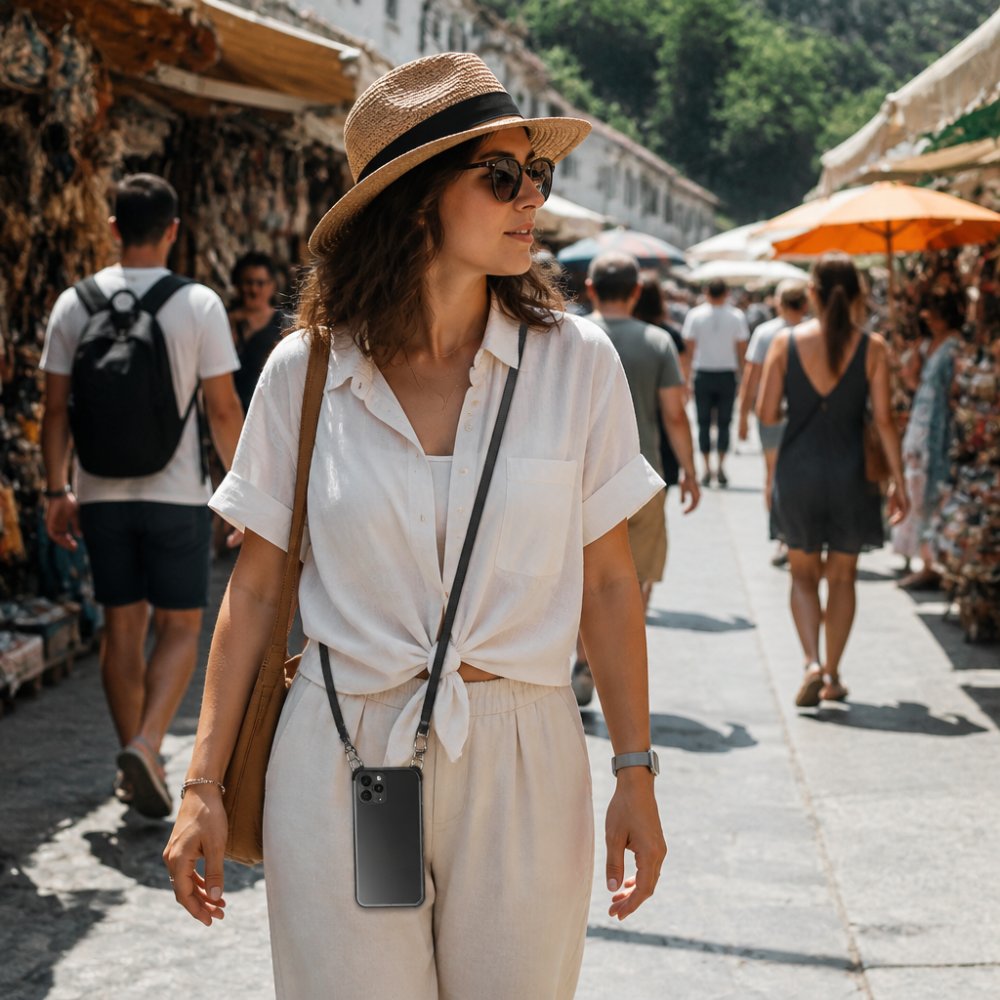
Crossbody lanyards hang the phone across your torso, resting at hip or chest level. They free both hands and keep the device in your line of sight. For crowded transit and long walking days, this is the stronger option because the strap would have to clear your head or shoulder before a thief could take it.
| Lanyard Type | Best For | Main Trade-Off |
|---|---|---|
| Wrist strap | Constant phone use, photos, transit apps | No protection when phone is set down; can slip off a loose wrist |
| Crossbody lanyard | Crowded transit, long walking days | Slightly more visible to others |
| Case with built-in strap | One-piece simplicity, everyday carry | Limited to compatible phone models |
What Actually Makes a Lanyard Secure
Four components decide whether a lanyard holds up under a real snatch attempt. Ask about each before you buy.
1. The attachment point. This is the weakest link in almost every setup. A lanyard is only as strong as the tab that connects it to your case. Thin fabric loops and adhesive tabs fail first; reinforced anchors that thread through a molded case opening or a metal ring distribute force across a wider area. If the attachment is a glued-on patch, treat it as decorative, not protective.
2. The cord or strap material. Woven cord and flat webbing resist cutting and stretching better than thin elastic or braided string. Elastic feels comfortable but stretches under load, which is the opposite of what you want during a tug. Look for a cord that holds its shape when you pull on it.
3. The hardware. Metal clasps, swivels, and adjusters outlast plastic ones, which can crack at stress points. A swivel matters more than it sounds: it prevents the cord from twisting into a knot that shortens its effective length and creates a snag hazard.
4. The length and fit. A crossbody strap should sit at hip or chest level when adjusted, not swing at knee height where it can catch on doors, seats, or railings. A wrist strap should be snug enough that it can't slide off your hand but loose enough to remove quickly.
Matching the Lanyard to How You Move
- Urban commuter or tourist: A crossbody lanyard with a reinforced anchor and metal hardware. You want the phone in front of you and the strap short enough that it can't be yanked from behind.
- Photographer or constant user: A wrist strap with a snug fit, paired with a case that has a molded attachment point rather than an adhesive one.
- One-piece simplicity: A case with the strap built directly into the shell eliminates the separate attachment point entirely, which removes the most common failure mode.
The CarNook™ FlexCord Phone Lanyard is a woven cord crossbody design built for hands-free carrying, so the phone stays reachable without digging through a bag. For travelers who want the strap built directly into the case, the CarNook™ ColorLoop Wristband Phone Case pairs a protective back cover with an integrated wrist strap that reduces accidental drops.

Step 3: Choose Crossbody Bags for Travel That Hold Your Phone Securely
Crossbody bags for travel solve a problem lanyards can't: they carry your cards, cash, and keys alongside the phone. The best ones share three traits: a zipper closure, a strap that crosses your body, and a pocket sized specifically for a phone.
Zippers matter more than style. An open-top bag is an invitation in a crowd, while a zipped compartment forces a thief to work in plain sight. Wear the bag with the closure facing your body, not outward.
The CarNook™ ZipCarry Crossbody Phone Case combines a phone case, a zipper pocket for cards and small essentials, and a crossbody strap in one piece, so there's no separate bag to manage. The CarNook™ CarryCard Crossbody Phone Case takes the same approach with an adjustable strap and built-in card storage for lighter travel days.

If you already own a phone case you like, you don't need to replace it. A standalone crossbody lanyard works with supported cases, which keeps your existing setup intact.
CarNook™ ColorLoop Wristband Phone Case →
Step 4: Match Protective Cases and Screen Protection to Your Trip
A protective case and a screen protector handle the threats a lanyard can't: drops, scratches, and impact. Match the level of protection to what you're actually doing.
- City travel: A slim case with raised edges around the camera and screen is enough. Bulk becomes annoying when you're pulling the phone out twenty times a day.
- Outdoor travel: Look for a case with reinforced corners and a textured grip. Wet hands and smooth plastic are a bad combination.
- Beach or water trips: Prioritize a case that seals against sand and splashes, and add a screen protector that won't trap grit underneath.
Screen protection is the cheapest insurance on the list. A tempered glass protector absorbs the scratch or chip that would otherwise hit the display, and it's replaceable in minutes.
Step 5: Plan Portable Power and Charging Solutions
A dead phone is a security problem, not just an inconvenience. No battery means no maps, no ride-hailing, no way to freeze a stolen card. A portable power bank keeps the device alive through long travel days.
Two practical rules apply. First, carry a power bank with enough capacity for at least one full charge, and keep it in the same bag as your phone so they stay together. Second, pack the right cable for your device and a spare if the trip runs long.
For international trips, a universal adapter with surge protection handles different outlet types and guards against voltage spikes that can damage electronics. Check that the adapter's plug configuration covers every country on your route before you leave.
Step 6: Set Up Digital Security and Device Prep
Physical security protects the hardware. Digital security protects everything on it, and it takes about twenty minutes to set up before a trip. Most guides treat these as two separate topics. They aren't. The physical accessories you chose in the earlier steps and the digital settings below reinforce each other, and the strongest setup links them deliberately.
Remote Wipe, Two-Factor Authentication, and Cloud Backup
Remote wipe is a feature that lets you erase a device's data remotely if it's lost or stolen, and it's the single most valuable setting to enable before you leave. Turn it on along with Find My or Find My Device. The catch: remote wipe only works while the phone still has power and a connection. That's where your power bank from Step 5 becomes a security tool, not just a convenience, a charged phone is a phone you can still locate and erase.
Two-factor authentication adds a second verification step to your accounts, so a stolen phone doesn't hand over your email, banking, and social profiles. Enable it on every account that offers it. If your second factor is a code sent to the same phone, switch it to an authenticator app or a hardware key so a thief who has the device can't also receive your codes.
Cloud backup ensures that even a wiped or lost phone doesn't mean lost photos, contacts, and documents. Confirm your backup ran successfully the day before departure. A backup is also what makes remote wipe a safe decision rather than a painful one, you can erase the device without losing what was on it.
Linking Physical and Digital Security
The two halves of your setup should cover each other's blind spots. A few deliberate pairings:
- Crossbody lanyard + remote wipe. The lanyard prevents the grab; remote wipe handles the scenario where it happens anyway. Neither replaces the other.
- Zippered crossbody bag + lock-screen previews off. The bag keeps the phone out of reach; disabling lock-screen previews means a thief who does get the phone can't read message contents or reset codes without unlocking it.
- Power bank + Find My. A dead phone can't be located. Keeping a charged bank in the same bag as the phone means you can still ping it, ring it, or wipe it if it goes missing.
- Case with built-in strap + strong passcode. The strap reduces drop-and-grab risk; the passcode means a phone that's briefly out of your hands still can't be opened.
A few more prep steps worth doing:
- Set a strong passcode and enable biometric unlock
- Turn off lock-screen previews so message contents don't show
- Install an eSIM or confirm roaming before you leave, so you're not hunting for a SIM card on arrival
- Log out of banking and shopping apps you won't need on the trip
- Save your device's IMEI number somewhere separate from the phone itself
According to the FCC's consumer guide on phone theft, reporting a stolen device and having it disabled quickly limits the damage. The IMEI is what lets a carrier block the device, so keep that number where a thief can't reach it.
How to Prevent Phone Theft While Traveling: Practical Habits That Work
Knowing how to prevent phone theft while traveling comes down to habits, not gear. The equipment helps, but behavior decides most outcomes.
- Keep the phone on your body, not in a bag you set down
- Never leave a device charging unattended in a public outlet
- Use the phone with your back to a wall in crowded spaces
- Avoid walking while scrolling; a distracted person is an easy mark
- Split valuables: carry one card separately from the rest
- Photograph your passport and insurance details, then store them in the cloud
The pattern behind all of these is visibility control. Thieves choose targets based on how easy the grab looks, so anything that makes the phone harder to reach and harder to snatch changes the calculation.
Common Mistakes to Avoid When Buying Travel Phone Accessories
The most common mistake is buying gear for looks instead of fit. A stylish crossbody bag with no zipper offers less protection than a plain one that closes properly.
Here's what else trips people up:
- Skipping the compatibility check. Lanyards and cases are model-specific. Confirm the attachment works with your phone before ordering.
- Buying everything at once. Start with the one accessory that matches your biggest risk, then add as you learn what you actually use.
- Ignoring the digital setup. A secure lanyard on a phone with no passcode and no remote wipe is half a solution.
- Overloading. A bag stuffed with gear is heavy, and heavy bags get set down. Carry less.
- Waiting until the airport. Buying accessories at the gate means paying more for less choice.
The travelers who stay secure are the ones who think about both halves of the problem: the physical device and the data inside it.
Phone theft and data loss are two separate risks, and closing only one leaves the trip exposed. CarNook Co. builds accessories that address the physical side with practical, everyday designs: the CarNook™ FlexCord Phone Lanyard for hands-free crossbody carrying, the CarNook™ ZipCarry Crossbody Phone Case for phone-plus-essentials storage, and the CarNook™ ColorLoop Wristband Phone Case for drop protection with a built-in strap. Pair them with the digital prep steps above, and the device stays with you and stays secure. Explore the CarNook Co. travel collection to find the setup that fits how you move.

Frequently Asked Questions
What is the best anti-theft phone lanyard for travel?
The best anti-theft phone lanyard depends on your activity. A crossbody lanyard keeps your phone in front of you and harder to grab, while a wrist strap works well for quick errands and events. Look for woven cord construction, a secure attachment point that connects to your case, and a length that lets you keep the phone at hip level or higher. CarNook offers the FlexCord Phone Lanyard with a woven cord design and crossbody style, and the ColorLoop Wristband Phone Case with a built-in wrist strap for drop protection.
Are crossbody phone cases effective for theft prevention?
Yes, crossbody phone cases are effective because they keep your device attached to your body and positioned in front of you, which makes snatching harder. Pickpockets typically target phones in back pockets, open bags, or hands. A crossbody case removes those easy access points. Models with a zipper compartment also keep cards and cash separate from your phone, so you are not pulling out multiple items at once. CarNook's ZipCarry and CarryCard crossbody cases both include built-in storage and adjustable straps.
How do I choose between a phone lanyard and a crossbody bag?
Choose a phone lanyard when you want minimal carry and quick access, such as walking through a festival or running errands. Choose a crossbody bag or crossbody phone case when you need to carry cards, cash, or small essentials alongside your phone. For travel days that mix transit, sightseeing, and meals, a crossbody wallet case covers more situations. If you prefer to keep your current phone case, a standalone lanyard that attaches to your existing case is the simpler option.
What features should I look for in a secure travel phone case?
Look for a case that attaches firmly to your carrying method, whether that is a lanyard, wrist strap, or crossbody strap. Check the material for durability and grip. TPU and PC blends handle everyday bumps, while PU leather works well for wallet-style crossbody cases. Confirm the case fits your specific phone model and allows access to buttons, ports, and cameras. If you want built-in storage, a zipper pocket keeps cards and small items separate from the phone.