


⚡ Free Express Shipping in USA✦
🔥 Newest Arrival Collection Live Now✦
✨ SUBSCRIBE TO GET YOUR 10% Off✦

Last Updated: November 1, 2026
Quick Summary
To secure tech while commuting by car, mount your phone in a holder, place laptops flat in a padded sleeve on the floor or trunk, and route cables away from the pedals. Build a quick gear checklist, restrain loose items in closed bins or with straps, and take devices with you on brief stops.
The best ways to secure tech while commuting by car start with one hard fact: loose devices become projectiles in a sudden stop, so a secure tech routine matters. According to the National Highway Traffic Safety Administration's distracted driving data, 3,208 people were killed in motor vehicle crashes involving distracted driving in 2024. A phone sliding across the seat or a laptop tumbling off the passenger chair pulls your eyes off the road at the worst moment.
This guide from CarNook covers a simple routine for locking down phones, laptops, cables, and cargo before you shift into drive. Below, you'll find eight practical steps, plus a plan for those quick stops when you leave the car for a minute or two.
Securing tech is the practice of placing, mounting, and concealing devices so they stay put during a drive and stay out of sight when you park. It covers three things: physical restraint, temperature protection, and data privacy.
Securing your devices can mean fewer distractions, less risk of damage, and less temptation for a thief who spots something through the window.
A quick checklist beats a scramble in the driveway. Most people forget one item, then dig for it at a red light. That dig is the distraction.
Run through this list before you lock the front door:
The checklist takes under a minute. It saves you from searching mid-drive.
Watch out: A cable draped across the shifter or footwell can catch on your hand or foot. Route every cord along the console edge, away from the controls.
The right car phone mount keeps your phone visible for navigation without your hands leaving the wheel. Pick one that matches how you drive, not just how it looks.
Here's how the main styles compare:
| Mount Type | Best For | Trade-Off |
|---|---|---|
| Suction-cup windshield/dash | Long commutes, GPS use | Needs a clean, flat surface |
| Vent clip | Quick install, small phones | Can block airflow |
| Dashboard adhesive | Minimal clutter | Adhesive grip varies by surface |
| Magnetic | One-hand attach | Needs a magnetic-compatible case |
For drivers who want charging and mounting in one piece, the CarNook™ Wireless Charging Phone Holder uses a suction-cup base, automatic clamping, and Qi wireless charging up to 15W depending on your device and power source. If you prefer a cleaner dash, the CarNook™ DashGrip Secure Dashboard Smartphone Holder is a compact, foldable option that needs no power.

Want a deeper comparison before you buy? The hands-free car phone mount buyer's guide walks through the options.
Watch out: Mounts can lose their grip over time, depending on the product and conditions. Clean and dry the surface first, and follow the manufacturer's install instructions.
Keeping your phone from sliding in the car comes down to friction and a fixed spot. A phone on a smooth seat will move the moment you brake.
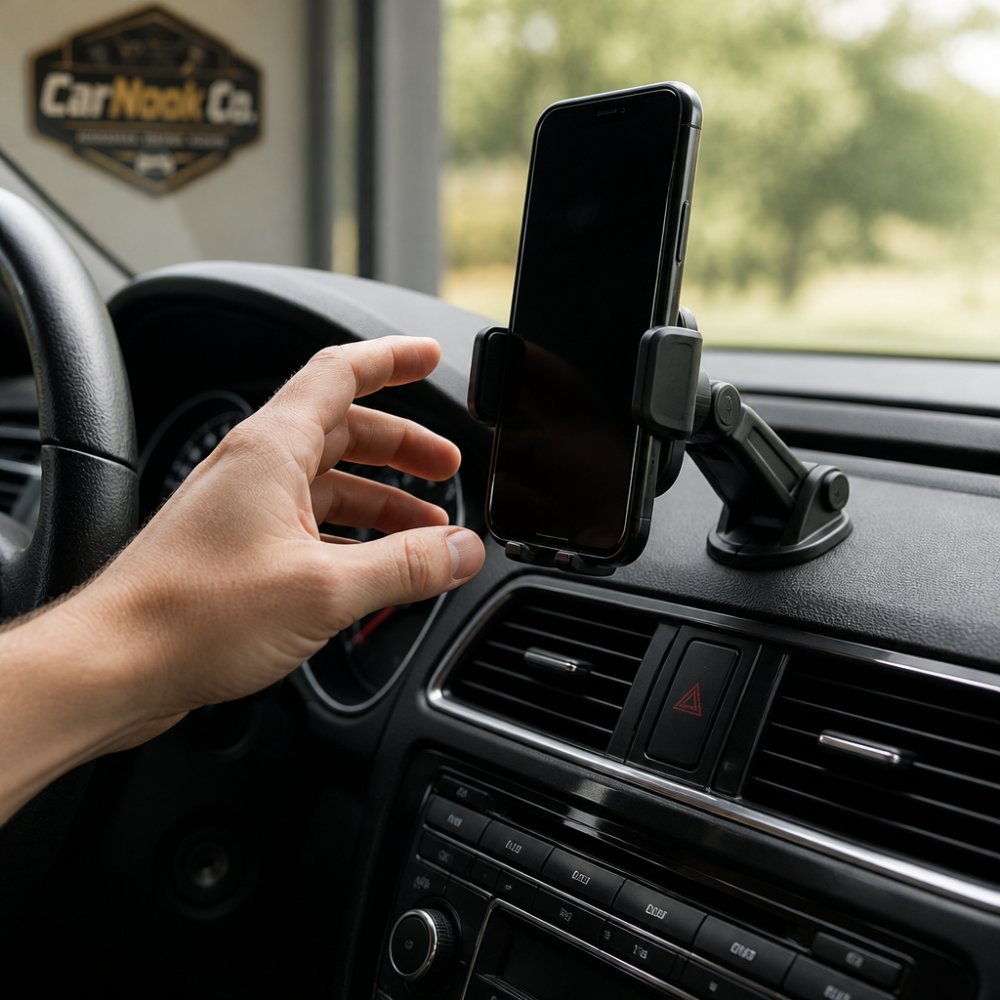
Try these fixes:
A textured phone case can also help. The CarNook™ FlexShield Shock-Absorbing Protective Phone Cover is made from flexible TPU and has a stylish 3D striped pattern.
To secure a laptop in the car, treat it like cargo, not a passenger. An unsecured laptop slides, flips, and takes hits in even a short stop.
Start with a padded sleeve or bag. Then place it low and forward of the seat, on the floor behind the driver or passenger seat, or in the trunk. Never balance it on the passenger seat or the rear deck.
A few practical rules:
If you carry a laptop daily, a simple floor bin or a seat-back organizer keeps it from shifting and keeps it hidden from a passerby's view.
A crossbody phone case for commuting solves the in-and-out problem. You park, step out, and your phone and cards come with you, hands free.
CarNook™ Wireless Charging Phone Holder →
This matters most on mixed commutes: drive to the lot, walk to the train, then walk to the office. A phone left in the car is a target. A phone on a strap stays with you.
The CarNook™ ZipCarry Crossbody Phone Bag with Zipper Storage combines a phone case, a built-in zipper pocket for cards and small essentials, and a crossbody strap. It is designed for select Samsung Galaxy models, so check compatibility before you order.

Best for: Commuters who park and walk, and anyone who wants phone and cards in one place. Skip if: You keep your phone mounted the whole trip and never leave the car.
Heat is the quiet killer of car electronics. A phone or laptop left in a hot car can overheat, slow down, or shut off. Cold can drain a battery faster too.
Simple habits help:
For more cooling tips, read how to prevent phone overheating while using GPS navigation.
Loose items turn into hazards when they slide. Secure cargo so nothing shifts into the driver's footwell or against your devices. This is where most guides stop at "use a strap." The device-specific part matters more for a tech commute, because a laptop, tablet, or power bank has different restraint needs than a box of groceries.
Start with the right restraint for the load:
A padded sleeve protects a laptop from scratches, but it does not stop the laptop from becoming a projectile. Treat the sleeve as padding and the bin, net, or strap as the actual restraint.
A heavy item held only by a bungee cord can break free in a hard stop. Match the strap to the weight, check the tension before you drive, and re-check after the first few miles. For anything in an open bed or hatch, a cargo net plus a closed bin is typically more reliable than a single strap because it contains items in more than one direction.
Wondering whether a trunk organizer is worth it? The trunk organizer guide for daily commuters can help you think through options before you buy.
Your devices carry more than hardware. They hold accounts, cards, and personal data. Beyond the basics, a connected car adds another layer to consider: what your phone and vehicle are paired to and what they remember.
A phone that is discoverable and paired to everything is easier to track and easier to connect to without your knowledge.
If your car has connected features, review which apps have access to location, contacts, and vehicle data. Privacy settings are easier to fix at home than in a parking lot. Check whether the vehicle's companion app shares trip history or location with anyone else on the account, and confirm who else has access.
None of this replaces physical security, but it closes the digital side of the commute that a locked door and a hidden bag can't cover.
Quick stops can be a time when devices left in view are at risk. Even a short run into a store leaves time for someone to spot a phone on a seat.
Follow a short routine every time you step out:
If you must leave a device behind, hide it before you arrive. Stowing a bag after you stop can draw attention to where it is kept, so it is best to store items before you park.
Commuting with tech doesn't have to mean loose phones, sliding laptops, and a cluttered console. A mount, a strap, a checklist, and a few smart habits keep your devices secure and your focus on the road. CarNook offers practical gear for everyday commuting, including a wireless charging mount to hold and charge your phone, a crossbody phone bag for hands-free carry, and protective cases. Explore the CarNook collection and set up a commute where your tech stays put and your mind stays on the drive.
Mount your phone in a dedicated car phone mount so it stays visible and within reach without holding it. A mount that grips firmly and lets you adjust the viewing angle can help keep your attention on the road. If you use wireless charging, a Qi-compatible mount lets you charge and mount at the same time. Always follow the mount manufacturer's installation instructions, since fit and placement vary by vehicle.
Store a laptop flat on the floor behind a seat or in the trunk, ideally in a padded sleeve or bag, so it cannot slide or become a projectile in a sudden stop. Avoid leaving it on a seat where it can shift. If you must keep it in the cabin, tuck it low and secure it with the seat belt or a cargo strap. Never leave a laptop visible through the window when you park.
It depends on the conditions and how long you leave them. Heat and cold can affect battery performance and device health, and visible electronics can attract theft. If you must leave a device in the car, conceal it out of sight, park in a well-lit area, and lock all doors. For short stops, take small devices like your phone with you in a crossbody case or pocket.
A secure car phone mount, a retractable charging adapter to cut cable clutter, a protective phone case with magnetic compatibility, and a crossbody phone case for hands-free carrying all help. For larger gear, a padded laptop sleeve and cargo straps keep items from shifting. A small organizer for cables and adapters also makes it easier to find what you need without digging around while driving.


