


⚡ Free Express Shipping in USA✦
🔥 Newest Arrival Collection Live Now✦
✨ SUBSCRIBE TO GET YOUR 10% Off✦

Last Updated: November 4, 2026
Quick Summary
The best dashboard placement keeps your phone close to eye level and within your line of sight, near the top of the dashboard and slightly to the right of the wheel. This position shortens glance time and keeps the phone clear of airbag panels and your view of the road.
Distracted driving accounts for 8% of fatal crashes and 13% of injury crashes, according to the FCC's distracted driving guide. Where your phone sits can add to that risk or reduce it. This guide from CarNook Co. covers the best dashboard placement for distraction-free driving, from eye-level positioning to the zones you should avoid.
Dashboard placement is the spot where your phone sits on or near the dashboard while you drive. It decides how far your eyes travel and how long they stay off the road.
A phone down in a cupholder pulls your gaze off the road for seconds at a time. A phone mounted high and close to your line of sight cuts that glance time. The difference sounds small. At highway speed, it is not.
Below, you'll find the eye-level rule, mount-by-mount pros and cons, and a step-by-step install plan.
The best dashboard placement keeps your phone close to eye level and within your line of sight. That single rule does more for driver focus than any mount feature.
Glance time is the total seconds your eyes leave the road to check a screen. Line of sight is the straight path between your eyes and the road ahead. A mount that pulls your view far to the side or down low stretches both.
The Insurance Institute for Highway Safety found that 1.9% of drivers stopped at intersections were observed using hand-held phones at any given moment in a 2024 observational survey. Every one of those glances started somewhere. Placement decides where.
Aim for a mount position where your phone sits near the top of the dashboard, slightly to the right of the wheel. You should be able to read a turn instruction with a quick eye shift, not a head turn.
Each mount type changes where your phone sits and how stable it stays. Here is how the three main options compare.
| Mount Type | Where the Phone Sits | Pros | Cons |
|---|---|---|---|
| Dashboard | Top of dash, near eye level | Close to sight line, no glass contact | Adhesive can loosen with heat |
| Windshield | On the glass, mid-height | High, adjustable position | Can block part of the view |
| Vent | On an air vent | Compact, easy to reach | Low position, airflow blocked |
A dashboard mount puts the phone at the top of the dash, close to your natural sight line. Many models use an adhesive base, and the viewing angle usually adjusts.
The upside is position. The phone sits high enough to read at a glance without blocking the windshield. The trade-off is heat. Adhesive bases can loosen over time in a hot car, so surface prep matters.
A foldable design like the CarNook™ DashGrip Secure Dashboard Smartphone Holder keeps the mount compact when not in use.

Windshield mounts attach to the glass with a suction cup. They offer the highest, most adjustable position of the three types.
That height helps line of sight. But a mount placed too high or too central can block part of your view of the road. Keep it low on the glass and toward the passenger side.
Vent mounts clip to an air vent. They are compact and put the phone within easy reach.
The catch is height. Most vents sit lower than the dashboard, so the phone pulls your gaze down. Vent clips can also block airflow from that vent. A magnetic car mount like the CarNook™ Magnetic Phone Mount for Hands-Free Driving offers a compact magnetic design.

Safe phone mount locations share three traits: near eye level, within easy reach, and clear of anything that inflates or blocks your view. Placement is the whole game here.
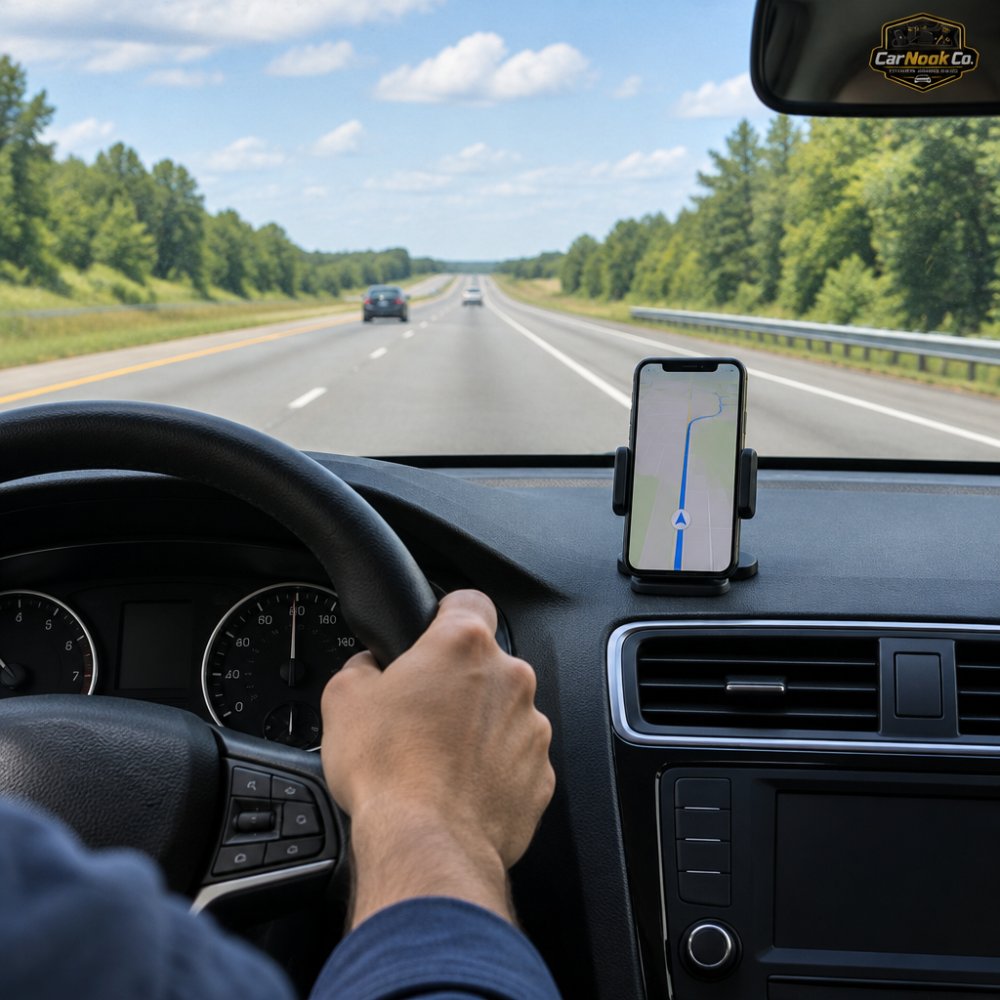
Good spots:
Zones to avoid:
For readers planning around vent placement, this guide on mounting a phone without blocking air vents walks through the trade-offs.
Airbag panels and windshield space are the two hard limits on dashboard placement. Both can turn a convenient mount into a hazard, and most placement guides skip them entirely.
Airbags are designed to inflate quickly toward the occupant. A side-curtain airbag drops down along the window line. A knee airbag deploys from the lower dash. A phone or mount sitting over any of those panels can be launched toward you when the bag fires, and the bag itself can be blocked from doing its job.
That is why the safe zone is not simply "top of the dash." It is the part of the dash that is clear of every inflatable panel. Check your owner's manual for the airbag locations on your specific vehicle, the panels are usually marked SRS or AIRBAG on the trim, but the manual is the authoritative source. Keep the mount and the phone clear of every marked panel, including the passenger-side dash if a passenger airbag sits behind it.
Airbag locations vary by vehicle, so check your owner's manual before choosing a spot.
Windshield obstruction is the other limit. A phone or mount that covers part of your view of the road can break state rules and, more importantly, block your sight line. Windshield obstruction rules generally concern anything that blocks the driver's view.
Those rules vary by state, so check your state's driver handbook for the specifics that apply to you. Check your state's driver handbook for the specifics that apply to you, and treat the area directly in front of the driver and the center of the glass as off-limits regardless of what the statute says.
The National Safety Council notes that 17 states had laws banning drivers from holding electronic devices as of April 2026. A well-placed mount helps you comply with those hands-free rules, but it does not override the separate windshield-obstruction rules.
CarNook™ DashGrip Secure Dashboard Smartphone Holder →
Before you stick anything down, run this check:
For a deeper look at what is and is not allowed, this article on whether it is illegal to have a car mount covers the legal side in plain terms.
Hands-free driving removes the hand problem, not the attention problem. Cognitive load is the mental effort a task demands, and voice controls can still add to it.
Voice-activated technologies can still create mental distraction even when both hands stay on the wheel. Your eyes and hands can be free while your mind is still on the call.
That changes how you should think about placement. A mount that keeps your phone visible at a glance reduces visual distraction. It does not fix mental distraction from a long conversation or a fiddly voice menu.
The practical takeaway: use your mount for short navigation glances and quick calls, and keep the deeper tasks for parked moments. Placement handles the visual half. You handle the rest.
Most state distracted driving laws target what you do with your phone, not where the mount sits. Still, placement can affect whether you stay compliant.
Many state distracted driving laws target holding a phone while driving, so hands-free operation is the common thread. A secured mount can support that.
Some states also set rules on windshield obstructions. Those rules can limit where you place a mount on the glass. Check your state's driver handbook for the specifics that apply to you.
For a deeper look at what is and is not allowed, this article on whether it is illegal to have a car mount covers the legal side in plain terms.
Installing a car phone mount is usually quick. The goal is a spot near eye level, clear of airbags, and stable on your dash surface.
Skipping the test-fit can leave an adhesive base stuck in a spot that blocks your view. For curved dashboards, see these tips to stabilize a phone mount on a curved dashboard.
Vehicle shape and device type decide which mount fits best. A mount that suits one dashboard can fight another, and a placement that works for a phone may be wrong for a dashcam or a standalone GPS unit. This is where most guides stay generic, the advice below is organized around what actually varies under the glass.
Dashboards are not flat. The shape of yours narrows the safe spots before you ever pick a mount.
Vent clips are not one-size-fits-all. The vent shape decides whether a clip holds securely.
A vent mount also sits lower than the dash on most vehicles, which pulls your gaze down. If eye level is the priority, treat vent mounting as a fallback rather than a first choice.
Different devices have different optimal viewing requirements, and the same spot rarely suits all of them.
If you are mounting more than one device, plan the spots together so they do not compete for the same clear area.
Best for: flat dashboards and drivers who want a high, close sight line. Skip if: your dash has no flat, airbag-free spot, in which case a windshield mount may fit better.
A clamp-style mount like the CarNook™ Wireless Charging Phone Holder pairs automatic clamping with suction-cup mounting and offers Qi wireless charging for compatible smartphones. For readers working around a curved dash, these tips to stabilize a phone mount on a curved dashboard help.

Picking a mount comes down to three checks: position, stability, and fit with your phone. Get those right and the rest is easy.
Start with position. Decide whether your dash or windshield gives you the best eye-level spot. Then match the mount type to that surface. Finally, confirm the mount works with your phone size and case.
CarNook Co. offers car phone mounts and accessories for daily drivers, commuters, and road trippers. The lineup covers dashboard, magnetic, and wireless charging options, plus MagSafe-compatible accessories and phone cases. For a wider comparison, the hands-free car phone mount buyer's guide lays out the options side by side.
The safest spot is usually on the dashboard or windshield near the center of your view, positioned so the phone sits close to eye level and your eyes stay on the road. Keep the device out of the airbag deployment zone and clear of your forward view. A dashboard mount like the CarNook DashGrip keeps the phone within sight for navigation without taking up much space. Test the position while parked before you rely on it in traffic.
A mount itself doesn't cause distraction, but how you use it can. Voice-activated systems can still create cognitive distraction even with hands on the wheel. A well-placed mount reduces visual distraction by keeping the screen in your line of sight and cutting glance time. The goal is fewer and shorter looks at the screen, not zero attention to the road.
It depends on your state. Many states ban drivers from holding electronic devices, and some of those laws also restrict where a device can be mounted. Some states limit windshield mounting to specific areas. Check your state's rules before installing, and follow any mounting instructions from the product manufacturer. A dashboard mount can be a simpler option where windshield rules are strict.
A magnetic mount lets you attach and remove your phone with one hand, which can shorten the time your eyes leave the road. The CarNook Magnetic Phone Mount uses a strong magnetic hold and an adjustable viewing angle for navigation and calls, and it includes wireless charging for compatible smartphones. Pair it with a MagSafe-compatible case for a secure fit. Placement still matters most: keep the mount near eye level and away from airbag zones.
Your next drive is a chance to fix a small habit with a big payoff. CarNook Co. offers dashboard, magnetic, and wireless charging mounts designed to keep your phone secure and within view. Explore the DashGrip dashboard holder, the magnetic hands-free mount, and the wireless charging holder to find the setup that fits your car. Get started with CarNook Co. and build a cleaner, calmer dashboard for every trip.


