


⚡ Free Express Shipping in USA✦
🔥 Newest Arrival Collection Live Now✦
✨ SUBSCRIBE TO GET YOUR 10% Off✦

Last Updated: October 4, 2026
No, it is not illegal to have a car mount. A car mount is a legal accessory, and many states encourage hands-free setups because they reduce distracted driving.
The confusion comes from a simple mix-up. Drivers hear "hands-free law" and assume the mount itself is regulated. It is not. The law regulates what you do with your phone while driving, not the hardware holding it.
So the car mount is fine. Your behavior behind the wheel is what matters. Below, we break down the rules, show where a mount can and cannot go, and walk through an install that keeps your phone steady on a curved dashboard.
Hands-free driving laws regulate driver behavior, not hardware. They ban holding a phone, texting, and typing while the vehicle is moving. A phone in a mount is treated much like a phone in a cupholder: legal to have, but restricted in how you use it.
Here is the key distinction most drivers miss:
The National Highway Traffic Safety Administration's distracted driving guidance treats manual phone use as a primary distraction risk. That is why states push drivers toward mounted, hands-free setups rather than banning the mount.
Strict hands-free states go further. In these places, you cannot hold a phone at all while driving, even at a red light. Everything typically runs through voice commands, steering-wheel controls, or a single tap on a mounted device.
Rules differ by state and change over time. Some allow a single swipe or tap on a mounted phone; others prohibit nearly all manual interaction. Check your state's current driver handbook before assuming your habit is fine.
The pattern is consistent: the stricter the state, the more a secure mount matters. A phone sliding around the seat is a phone you will reach for. A phone locked in a mount stays put.
Hands-free means your hands stay on the wheel and your eyes stay on the road. That covers voice commands for calls, texts, and navigation; Bluetooth audio; a mounted phone you tap once to start navigation; and steering-wheel buttons for volume and calls.
A phone in a mount is not automatically hands-free. If you are typing an address while rolling through traffic, you are distracted regardless of where the phone sits. The mount only helps if you use it the right way.
Windshield phone mount legality varies because windshield rules focus on obstruction, not the mount itself. Some states restrict anything attached to the windshield; others allow it in a specific zone; a few say nothing at all. The same mount can be fine in one state and a citation risk in the next.

Windshield rules are usually written to protect the driver's forward field of view and the wiper sweep zone. A mount inside that zone can be treated as an obstruction even when it is not actively blocking anything you can see.
Most windshield statutes fall into a few patterns. The details change often, so treat this as a map of the terrain rather than a substitute for your state's current driver handbook.
| Placement | Typical Rule Pattern | Why It Matters |
|---|---|---|
| Windshield, lower corner (passenger side) | Often allowed with size or zone limits | Stays outside the driver's primary sight line |
| Windshield, center or driver side | Often restricted as an obstruction | Overlaps the forward view and wiper sweep |
| Windshield, above the dash line | Varies widely by state | Can fall inside or outside the allowed zone depending on the vehicle |
| Dashboard, below the top edge | Usually allowed | Not attached to the glass, so windshield rules often do not apply |
| Air vent | Usually allowed | Not attached to the glass |
A few examples illustrate the range. Some states have long restricted windshield attachments to specific zones and sizes, which is why a small lower-corner placement is often the safer choice there. Other states are silent, which does not mean anything goes, an officer can still cite a mount that blocks the view under a general obstruction statute. And some states allow windshield attachments only within a defined area, so a mount that works in one vehicle may sit outside the allowed zone in another.
The wiper sweep zone is the area the windshield wipers clear. In many places, that zone is treated as the driver's protected view area. A mount inside it can be read as an obstruction even if the phone is small and the mount is low-profile.
A practical check: sit in the driver's seat, look straight ahead, and imagine the arc the wipers trace. If any part of your mount or phone sits inside that arc on the driver's side, you are in the riskier zone. Moving the mount to the lower passenger-side corner typically keeps it outside that arc.
Drivers who cross state lines face a simple problem: the rule that applies at home may not apply where you are driving. The safest default is to avoid the windshield entirely and use a dashboard or vent mount, which sidesteps windshield-specific statutes in many places.
If you do use a windshield mount, a few habits reduce risk: keep the mount in the lower corner, away from the driver's forward view; avoid the center of the windshield entirely; check the mount position after any vehicle change, since dash height and windshield rake differ; and re-check your state's current driver handbook before relying on an old assumption.
Windshield glass gets hot in direct sun, and that heat can affect how a suction cup performs over time. A cup that holds well in mild weather may lose its seal in sustained heat, which is one reason some drivers prefer a dashboard or vent mount even where a windshield mount is allowed. If you do use a windshield mount, follow the manufacturer's instructions for surface prep and re-seating the cup, and check the seal periodically.
For drivers who want to skip the windshield question altogether, the CarNook™ MagClip Phone Holder is a compact magnetic option that works with compatible magnetic phones and cases, and it can be positioned on a dashboard or vent base rather than the glass.

Phone mount placement rules come down to one idea: do not block the driver's view. Most places allow a mount somewhere. The question is where yours is allowed to sit.
Safe zones usually include the dashboard below the top of the dash, an air vent near the center console, a flat section of dash to the right of the wheel, and a console or cup-holder area.
A good rule: if you have to lean or crane your neck to see the road past your phone, the mount is in the wrong spot. Move it before you drive, not while you drive.
Obstruction rules exist to protect your field of view. Officers and inspectors may look for anything that blocks the driver's line of sight through the windshield or hides dashboard instruments.
Two practical checks before every trip: can you see the full road ahead without leaning around the phone, and are all dashboard warning lights and gauges still visible? If either answer is no, reposition the mount. This is not about avoiding a ticket. A blocked view is a real hazard at highway speed, and the fix takes seconds.
Learning how to secure a phone mount to a dashboard starts with surface prep. Mounts often fail because of dust, oil, or a curved surface rather than a weak mount. Clean the spot, match the base to the surface, and press firmly.
Total time: 10 to 15 minutes Difficulty: Beginner
What you'll need:
CarNook™ DashGrip Phone Mount →
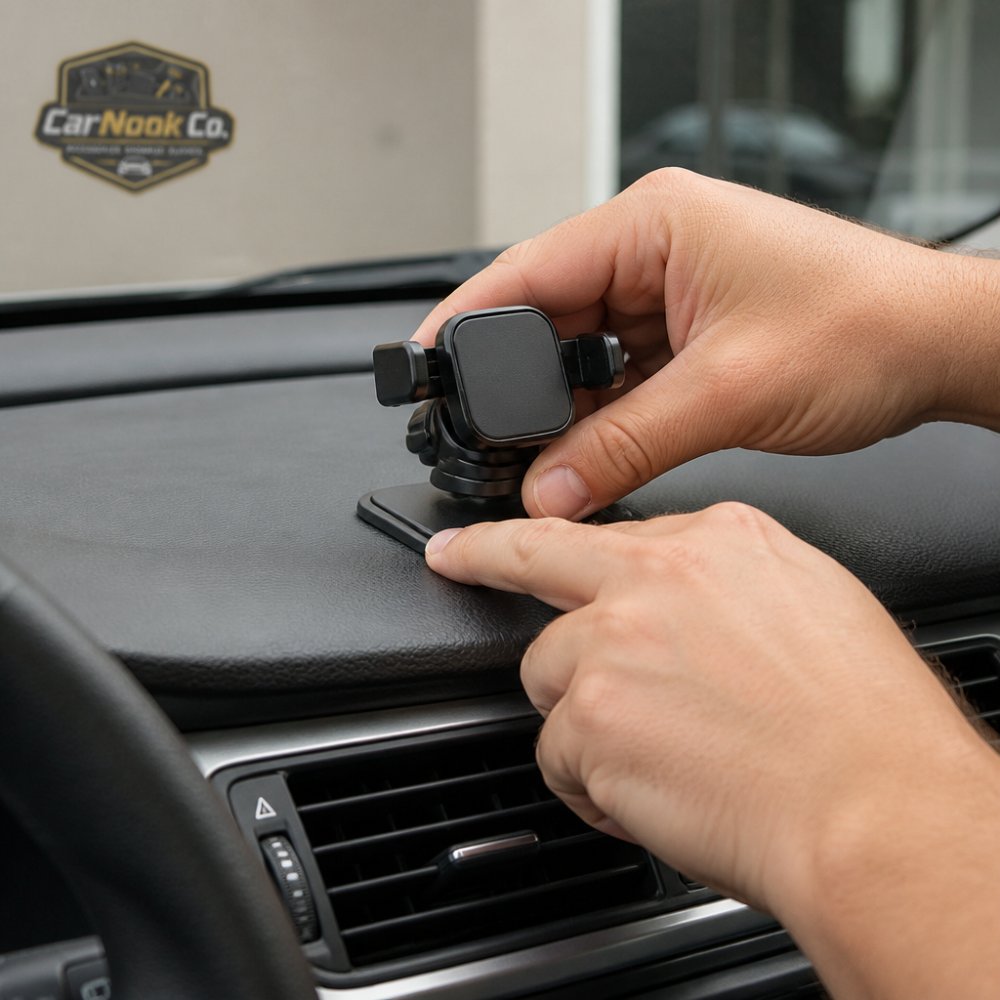
Expected result: The mount stays put when you tap the screen, and the phone sits within easy reach without blocking your view.
For a low-profile option, the CarNook™ MagClip Phone Holder uses a magnetic hold with a compact design, and it works with compatible magnetic phones and cases. The CarNook™ DashGrip Phone Mount is a dashboard-style holder with an adjustable viewing angle and a foldable design that helps keep the dash tidy.
A slipping mount is often a surface problem rather than a product problem. How to diagnose common causes:
| Symptom | Likely Cause | Fix |
|---|---|---|
| Mount slides sideways | Dust or oil on the dash | Clean with alcohol, let dry |
| Suction cup pops off | Air leak at the seal | Press firmly, use a gel pad |
| Adhesive lifts at one edge | Curved or textured surface | Move to a flatter spot |
| Mount holds cold but fails in heat | Heat softens adhesive | Use a heat-tolerant pad |
| Phone droops on the arm | Loose joint | Tighten the arm screw |
Curved and textured dashboards are among the hardest surfaces to mount on. A flat adhesive base cannot make full contact with a curved surface, and leather or textured surfaces do not give adhesive much to grab. The fix is usually to change the mount type or location, not to press harder.
A contour-matching wedge can help a flat base sit flush against a curved dashboard by filling the gap so the adhesive makes real contact. If the dashboard is leather or heavily textured, a vent mount is often the simpler path because it avoids the adhesion problem and keeps the phone at eye level.
This sequence works for most adhesive and gel-pad bases. Follow the manufacturer's instructions for your specific mount, since prep and set times can vary by product.
Total time: 10 to 15 minutes Difficulty: Beginner
What you'll need:
Expected result: The mount stays put when you tap the screen, and the phone sits within easy reach without blocking your view.
A slipping mount is often a surface or heat problem rather than a product problem. Match the symptom to a likely cause and fix:
| Symptom | Likely Cause | Fix |
|---|---|---|
| Mount slides sideways | Dust or oil on the dash | Clean with alcohol, let dry |
| Suction cup pops off | Air leak at the seal | Press firmly, use a gel pad |
| Adhesive lifts at one edge | Curved or textured surface | Move to a flatter spot or add a wedge |
| Mount holds cold but fails in heat | Heat softens adhesive | Use a heat-tolerant pad, re-seat in cooler conditions |
| Phone droops on the arm | Loose joint | Tighten the arm screw |
| Mount holds at first, then fails after weeks | Surface was not fully clean, or the pad aged | Remove, clean, and replace the pad |
Adhesives and suction pads can mark or damage trim if pulled off carelessly. A few habits reduce the risk: warm the adhesive slightly with a hair dryer on low, or park in the sun briefly, to soften the bond before pulling; slide a plastic card or trim tool under the edge rather than prying with a screwdriver; pull slowly and at a low angle, not straight up; clean residue with rubbing alcohol or a dedicated adhesive remover, and test on a hidden spot first; and follow the manufacturer's removal instructions, since some pads are designed to release with a pull tab.
Temperature swings affect how suction cups, gel pads, and adhesives perform over time. A cup that holds well in mild weather may lose its seal in sustained heat, and a gel pad can stiffen in cold.
For a low-profile option on a curved or textured dash, the CarNook™ DashGrip Phone Mount is a dashboard-style holder with an adjustable viewing angle and a foldable design that helps keep the dash tidy. Pair it with a CarNook phone case if you want a consistent surface for a magnetic or clamp-style holder.
A car mount can block your view if it sits in the wrong place, and that is where legal limits kick in.
Safety and legal limits usually focus on the windshield wiper sweep zone, your forward field of view, the dashboard instrument panel, and the rearview mirror sight line.
Keep your mount low and to the side. On most cars, the lower-right corner of the dash or a center vent keeps the phone visible to you without covering the road.
Visibility is not just a legal issue. A mount that forces you to look down or to the side pulls your eyes off the road longer than you think. Position the phone so a quick glance gives you the info you need.
Touching a phone in a car mount is allowed in many places, but often only for a single tap or swipe.
The safe pattern is to set your destination before you drive. Then leave the phone alone. If you need to change something, pull over.
A few habits that keep you compliant: start navigation before you shift into drive; use voice commands for calls and texts; set your playlist before you pull out; and pull over for anything that needs typing.
A secure mount makes the single-tap habit easier. When the phone is stable and angled toward you, you spend less time fiddling and more time watching the road.
Choosing a compliant car mount means matching the mount to your dashboard and your state's rules. The right pick keeps your phone secure, stays out of your sight line, and does not break placement limits.
Start with your dashboard surface. A flat dash handles an adhesive base well; a curved, textured, or leather dash often works better with a vent or windshield mount. Then check your state's windshield rules before committing to a glass-mounted option.
CarNook Co. carries dashboard, magnetic, and vent-friendly options built for everyday driving. The goal is a clean setup that keeps your phone in reach without adding clutter.
No, phone mounts are legal. What varies by state is how you can use your phone while driving. Many states require hands-free operation, which means your phone must be mounted or otherwise not held. A car mount actually helps you comply with these laws by keeping your phone stationary and within easy view for navigation. Check your specific state's hands-free driving laws for exact requirements.
Yes, if placed poorly. Most states prohibit objects that obstruct the driver's clear view of the road, and a phone mount positioned directly in your line of sight could violate this. Mount your phone low on the dashboard or on the windshield's lower corner so it doesn't block your view. The goal is to keep your phone visible for quick glances without covering the road ahead.
Suction cups and adhesive pads often fail on textured, curved, or dusty surfaces. Clean the area with isopropyl alcohol first, then press firmly and let the adhesive set. If your dashboard has deep curves or a leather-like texture, try a vent mount or windshield mount instead. Some drivers use a sticky gel pad beneath the mount base to create a flatter, more secure surface.
Clean the mounting area with isopropyl alcohol and let it dry completely. If using a suction mount, press the cup firmly against the surface and engage the locking lever. For adhesive mounts, peel the backing and press down for at least 30 seconds. Avoid curved or textured areas where possible. Follow the manufacturer's instructions for your specific mount, as curing times and surface requirements can vary.
Distracted driving rules keep changing, and a mount that worked in one state may need a new position in another. CarNook Co. offers practical car phone mounts and MagSafe-compatible accessories designed to keep your phone secure and within reach, including adjustable viewing angles, compact magnetic holders, and foldable dashboard designs that help reduce clutter. Explore the CarNook Co. collection and build a setup that keeps your hands on the wheel and your eyes on the road.

