


⚡ Free Express Shipping in USA✦
🔥 Newest Arrival Collection Live Now✦
✨ SUBSCRIBE TO GET YOUR 10% Off✦

Last Updated: October 25, 2026
Quick Summary
You know your phone needs a phone battery replacement when you see rapid drain, unexpected shutdowns with charge left, sudden percentage drops, overheating, slow charging, lag, or swelling. A battery health check on iPhone or Android confirms reduced capacity. Stop using the phone immediately if the battery is swollen.
A phone battery is a consumable part, not a permanent fixture.
The chemistry is straightforward. Each full charge and discharge counts as a cycle, and the materials inside the cell degrade gradually with use. Heat speeds that process up.
What most guides miss is that wear is cumulative and quiet. A battery rarely fails overnight. It fades, and the phone compensates in ways you might not notice until the drop becomes obvious.
That slow fade matters because the fix is cheap compared with a new phone.
The clearest indicators of a worn battery are rapid drain, unexpected shutdowns, sudden percentage drops, overheating, slow charging, lag, swelling, and a shrinking ability to hold a charge. Any one of these can point to a cell past its useful life. Two or more together make the case stronger.
Apple and other manufacturers publish general guidance on battery aging, and the common thread is capacity loss over time. As Apple's battery and performance documentation explains, a chemically aged battery can struggle to deliver peak power, which is why the phone sometimes behaves unpredictably.
Here is the short version before the detail:
| Symptom | What It Usually Means | Urgency |
|---|---|---|
| Rapid drain, short battery life | Reduced capacity from wear | Moderate |
| Shutdowns with charge left | Cell can't deliver peak power | High |
| Sudden percentage drops | Inaccurate gauge from aging | Moderate |
| Overheating, slow charging | Heat stress or charging fault | High if hot |
| Sluggish performance, lag | Power management throttling | Moderate |
| Swollen or bulging phone | Cell damage, safety risk | Stop using now |
The sections below break down each one.
Rapid battery drain is the most common early signal. A phone that used to last a full day now needs a top-up by mid-afternoon, and the pattern gets worse over weeks rather than days.
Watch for a battery that drops quickly during light tasks like texting or browsing. If standby time has shrunk noticeably, the cell is holding less charge than before. That is reduced capacity in action, and it is normal with age.
A common mistake is blaming the phone itself. In practice, a worn cell explains most gradual declines in daily runtime once background app use has been ruled out.
An unexpected shutdown with charge still showing is a stronger warning. The phone reports remaining charge, then powers off without warning, and restarting may show a very different percentage.
This happens when an aged cell can no longer supply the burst of power a demanding task needs. The gauge and the real capacity drift apart, so the battery percentage becomes unreliable and drops in jumps rather than smoothly.
If the phone shuts off during a call or while the camera opens, treat it as a sign the battery is struggling under load.
A hot phone during ordinary use or charging deserves attention. Some warmth is normal, but a device that overheats while idle or during a routine charge is telling you something.
Slow charging and inconsistent charging often accompany a failing cell. The phone may charge to a point, stall, or refuse to take a full charge. Charging time stretches out, and the connection feels unreliable.
Heat and charging problems can also come from the cable, the adapter, or the port rather than the battery. Readers wondering whether a magnetic accessory is the culprit can check do magnetic mounts damage phone battery for the facts. For practical ways to keep a phone cool during demanding use like navigation, see prevent phone overheating while using GPS navigation.
Watch out: if the phone or charger becomes uncomfortably hot to the touch, unplug it and stop charging until you can have it checked.
Sluggish performance, lag, and freezing can trace back to a tired battery. When a cell cannot deliver steady power, the phone's power management may limit peak performance to avoid a sudden shutdown.
The result is an interface that stutters, apps that take longer to open, and occasional freezes under load. This is the same mechanism Apple describes in its peak performance guidance, where an aging battery triggers performance management.
Not every slow phone needs a new battery. Software updates and a full storage drive cause similar symptoms, which is why the next two sections help you separate the causes.
A phone battery health check shows the current capacity of your cell compared with when it was new. On iPhone, open Settings, then Battery, then Battery Health & Charging to see maximum capacity and peak performance capability.
Here is how to run one on each platform:
The exact numbers that trigger a service recommendation differ by manufacturer, so follow the guidance shown on your own device rather than a universal figure. What matters is the trend: a capacity reading that keeps falling, paired with the symptoms above, points toward battery replacement.
A phone battery draining fast is not always a hardware problem. Apps running in the background, location services left on, and a weak signal can all pull power. Before you replace anything, rule out software.
Start with the battery usage screen on your phone. It ranks which apps consumed the most power and how much was used in the background.
Then try these steps:
If the drain continues after these steps, and the health check shows reduced capacity, the battery is the more likely cause. Readers trying to rule out accessories can read do MagSafe accessories damage phone battery for a plain explanation.
Most phone batteries are designed to retain a usable share of their original capacity across a few hundred full charge cycles, though how long do phone batteries last depends on use, heat, and charging habits. Manufacturers typically rate cells for a set number of cycles before capacity drops to a defined level, and the specific figures vary by device.
CarNook™ Wireless Charging Car Mount →
Factors that accelerate degradation include:
Charge cycles are the key measure. One cycle is a full discharge and recharge, and partial top-ups add up to cycles over time. A phone charged once a day will typically reach its rated cycle count sooner than one charged every other day.
A swollen phone battery is a safety issue, not a convenience one. When a lithium-ion cell expands, it can press against the screen, back panel, or internal components, and in rare cases a damaged cell can pose a fire risk. The right response is to stop using the phone and have it inspected by a qualified technician.
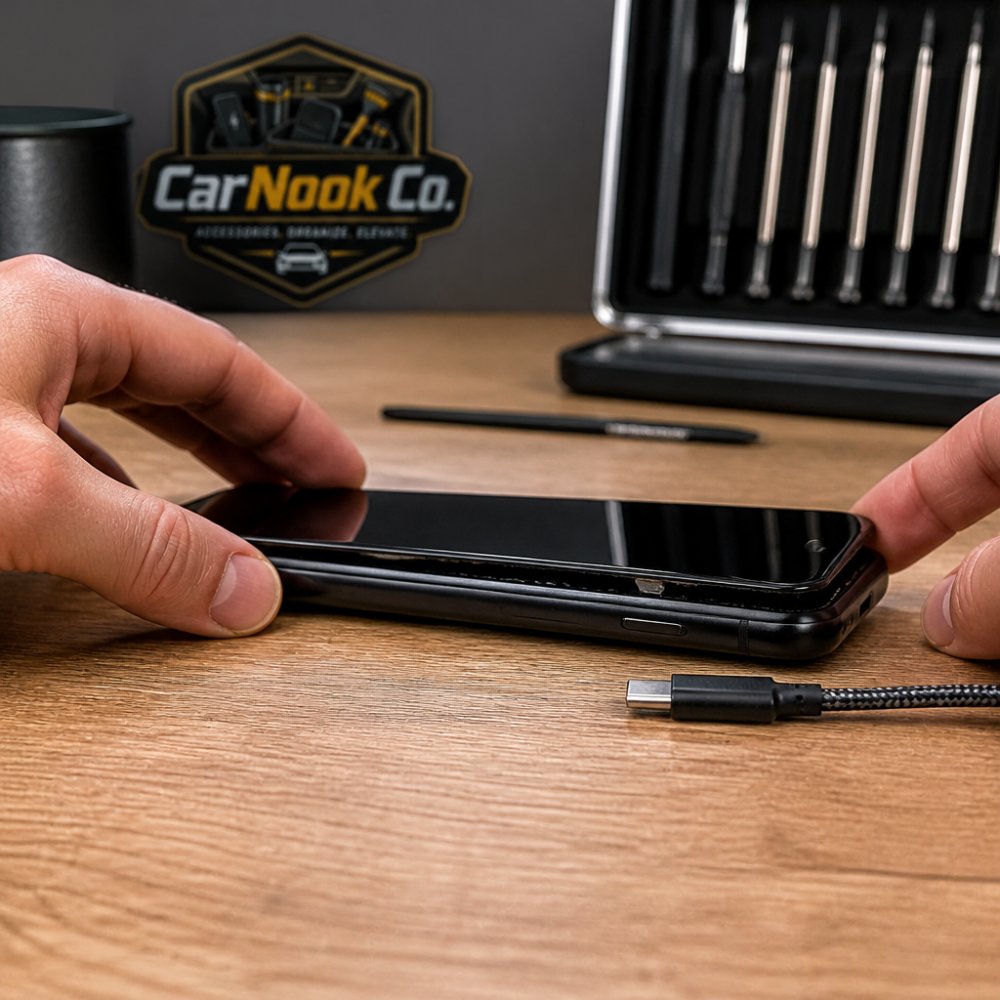
Look for a battery swelling sign you can see or feel:
Some swelling starts internally before any external sign is obvious. If the phone has been dropped, crushed, or exposed to water and then starts behaving oddly, treat it as a possible damaged cell even without visible bulging.
This is where most symptom lists stop, and it is the part that matters most. Follow this sequence:
A swollen battery should not go in household trash or a standard recycling bin. Many communities and retailers accept lithium-ion batteries through designated hazardous-waste or battery-recycling programs, and requirements vary by location. Ask the repair provider or your local waste authority how to dispose of or recycle the removed cell safely. Until then, store the phone in a cool, dry spot away from heat sources and out of reach of children and pets.
Swelling typically traces to a cell that has aged, been exposed to heat, been physically damaged, or been charged improperly over time. It is not something a software update or a charging-habit change can reverse. Once a cell has expanded, replacement is the appropriate fix, and prompt replacement is the safer choice than waiting for the swelling to worsen.
If you are ruling out accessories as a contributing factor, do magnetic mounts damage phone battery explains what magnetic accessories can and cannot do to a phone's battery.
Once you have confirmed that the battery is the problem, the next decision is whether to replace the cell or replace the whole phone. The answer depends less on the battery itself and more on the rest of the device and what you need from it.
Work through these questions in order. The first "no" usually points toward a new phone; a run of "yes" answers points toward a battery replacement.
Battery replacement pricing varies widely by device model, whether you use an authorized service provider or an independent shop, and whether the repair involves OEM or aftermarket parts. Check current pricing directly with the manufacturer's service page and a couple of local repair shops, and ask what the quote includes, parts, labor, diagnostics, and any fees. Compare that against the full cost of a new device, including any trade-in value for the old phone.
A few cost-related questions worth asking the shop:
Repair time depends on the provider and parts availability. Authorized service channels may take longer if parts must be ordered, while independent shops may offer same-day service depending on the model. Ask about turnaround before you commit, and plan for a backup phone or a loaner if you rely on the device for work.
Before you book a repair, check whether your phone is still under a manufacturer warranty or an extended protection plan, and whether battery service is covered. Coverage terms vary by plan and by the cause of the issue, a battery that has simply aged is often treated differently from one damaged by an accident or liquid. Read the terms or call the provider before you authorize work, and keep the repair receipt in case a warranty question comes up later.
A new phone is the better call when the device is out of software support, physically damaged beyond the battery, or consistently slow for reasons unrelated to power. It is also reasonable when the total repair cost approaches a meaningful share of a new device's price, or when you were already planning to upgrade.
A common mistake is replacing a phone for a problem a new cell would fix. If the health check shows reduced capacity and the phone otherwise performs well, the battery is often the more economical choice, but confirm current pricing and coverage before deciding.
A few practical steps make the process smoother:
After the replacement, follow the manufacturer's or repairer's charging instructions rather than a fixed routine, since guidance varies by device. Then watch for runtime returning to normal, shutdowns stopping, and the percentage gauge behaving smoothly again. A reliable charging setup helps protect the new cell, the CarNook™ 4-in-1 Retractable Fast Car Charger keeps cables tidy and multiple devices powered on the road, which makes regular top-ups easier without console clutter.

Before a phone battery replacement, back up your data, note your passcode, and confirm the repair shop's warranty terms in writing. Turn off find-my-device features if the technician asks, and remove any case and accessories.
After the replacement, follow the manufacturer's or repairer's charging instructions rather than a fixed routine, since guidance varies by device. Then watch for these outcomes:
To keep the new cell healthy, avoid leaving the phone at full charge in a hot car and top up during the day rather than running to zero. A reliable charging setup helps here. The CarNook™ 4-in-1 Retractable Fast Car Charger keeps cables tidy and multiple devices powered on the road, which makes regular top-ups easier without console clutter.
A fresh battery only helps if the phone stays powered and within reach while driving. That is where a secure mount earns its place, especially for navigation, rideshare work, and road trips.
The CarNook™ Wireless Charging Car Mount holds the phone firmly with automatic clamping and a strong suction-cup mount, and it delivers Qi wireless charging so the phone stays topped up while you drive.

At CarNook Co., the goal is simple: accessories that make daily driving cleaner and easier. Explore the full range of car mounts and charging gear to find a setup that fits your phone and your vehicle.
Look for a cluster of symptoms rather than one: rapid battery drain, unexpected shutdowns while charge remains, sudden percentage drops, overheating during ordinary use, slow or inconsistent charging, and sluggish performance. A phone battery health check helps confirm it. On iPhone, open Settings > Battery > Battery Health; on Android, use Settings > Battery or a diagnostic tool, depending on the manufacturer. If several symptoms line up with a low health reading, a phone battery replacement is usually the next step.
Yes. A worn battery can struggle to deliver the burst of power the phone needs during demanding tasks, so the device may shut off even when the battery percentage shows remaining charge. This often happens in cold weather, during camera use, or when opening a heavy app. If shutdowns repeat at the same percentage, run a phone battery health check and consider a phone battery replacement rather than assuming the phone itself is failing.
No. A swollen phone battery is a safety issue, not just a performance one. Stop charging the device, avoid pressing on the screen or back panel, and do not puncture or bend the phone. Power it down if you can and have it inspected or replaced by a qualified repair professional. Swelling can worsen over time, so treat a bulging phone as urgent and keep it away from flammable materials until it is serviced.
It depends on the phone's age, overall condition, and how much a phone battery replacement costs compared with the device's value. If the phone is otherwise fast, holds a good screen, and receives software updates, replacing the battery is often the more economical choice. If the phone is several years old, has other faults, or no longer gets updates, putting the money toward a new device may make more sense.
A worn battery is one of the few phone problems with a straightforward, affordable fix. If the symptoms above match what you are seeing, a health check and a replacement can bring your device back to full speed. Get started with CarNook Co. and keep your phone secure, charged, and ready for every drive.


