



Table of Contents
- How MagSafe Wireless Charging Actually Works
- MagSafe vs. Standard Qi: Charging Speed Compared
- Power Delivery: Why Your Adapter Sets the Ceiling
- How Phone Cases Change MagSafe Charging Speed
- Heat, Thermal Management, and Battery Longevity
- Real-World Charging Curves and Ambient Temperature
- Do Magnetic Car Mounts Damage Phone Batteries?
- Best Practices for iPhone Wireless Charging
- Frequently Asked Questions
Last Updated: September 13, 2026
How MagSafe Wireless Charging Actually Works
Does MagSafe affect wireless charging speed? Yes, and usually in your favor. MagSafe is Apple's magnetic charging system that snaps a compatible iPhone into precise alignment with a charging coil, and that alignment is the single biggest factor in how fast a wireless charge actually moves. This guide from CarNook Co. breaks down where the speed gains come from, where they disappear, and how to get the most out of every charge.
The technology itself is straightforward. MagSafe is a magnetic charging standard that uses a ring of magnets around a wireless charging coil to lock a phone into perfect alignment with a charging pad. Standard Qi charging, by contrast, relies on the user placing the phone correctly by eye.
Magnetic Alignment vs. Qi Coil Guessing
Alignment precision is the whole story. A wireless charging coil only transfers power efficiently when the phone's internal coil sits directly over the pad's coil. Shift the phone even a few millimeters and charging efficiency drops, because the magnetic field between the two coils weakens.
MagSafe solves this mechanically. The magnetic array pulls the phone into the correct position every time, which means the coils line up consistently rather than approximately. That consistency is why a MagSafe connection tends to hold a higher, steadier wattage than a Qi pad where the phone has drifted off-center.
Apple's official MagSafe support documentation
MagSafe vs. Standard Qi: Charging Speed Compared
MagSafe delivers more power than standard Qi in most real-world scenarios, and the difference comes down to wattage ceilings and how consistently a connection holds them. Here is how the two stack up on a compatible iPhone:
Charging Method |
Typical Peak Power |
Alignment |
Speed Outcome |
|---|---|---|---|
MagSafe (official puck or certified pad) |
Up to 15W on compatible iPhone models |
Magnetic, automatic |
Fastest wireless option |
Standard Qi pad |
Typically 5W to 7.5W on iPhone |
Manual placement |
Slower, varies by position |
Misaligned Qi pad |
Often drops to 5W or below |
Off-center |
Slowest, most heat |
Those wattage figures are the widely published ceilings for each standard on iPhone hardware. Android phones on the Qi standard can hit higher numbers depending on the manufacturer, but the comparison logic holds: a magnetic connection holds its ceiling more reliably than a pad where the phone can drift.
What Peak Power Really Means in Practice
Peak power is a ceiling, not a guarantee. A charger rated for 15W only delivers that number under ideal conditions: correct alignment, a capable power adapter, a compatible case, and a phone that is not already warm. In practice, most phones spend only part of a charging session at peak wattage.
That is the part most guides skip. The number on the box describes the best case. The charging curve, which is how power tapers as the battery fills, describes what you actually experience.
The Charging Curve, Not the Box Number
A wireless charging session follows a predictable shape. Power is highest when the battery is low, holds roughly steady through the middle of the charge, then tapers sharply as the battery approaches full. The final stretch, from roughly 80 percent to 100 percent, is intentionally slow because a nearly full lithium-ion battery cannot absorb energy quickly without stress.
What this means for the MagSafe vs. Qi question:
- 0 to 50 percent: The gap between MagSafe and a well-aligned Qi pad is at its widest here, because both are running near their ceilings and MagSafe's ceiling is higher.
- 50 to 80 percent: The gap narrows. Both methods taper, and the difference becomes a matter of minutes rather than a dramatic split.
- 80 to 100 percent: The gap is nearly gone. Both methods slow to a trickle to protect the battery, so a MagSafe charger will not finish dramatically faster than a Qi pad in this range.
A common pattern is that MagSafe's real advantage shows up in the first half of a charge, when you need a quick top-up before leaving the house. For an overnight charge, the difference between the two methods is far less noticeable because both spend hours in the slow taper zone.
Apple's official MagSafe support documentation
Power Delivery: Why Your Adapter Sets the Ceiling
The wall adapter is the most common bottleneck, and it is the factor most people never check. A MagSafe puck or pad can only pass through as much power as the adapter feeding it supplies. Pair a fast charger with a weak adapter and the adapter wins, every time.
The standard that matters here is USB Power Delivery (USB PD). It is the protocol that lets a charger and a device negotiate wattage over a USB-C cable. A MagSafe charger expects a USB-C PD adapter that can supply enough wattage to hit its top speed. If the adapter cannot negotiate that wattage, the charger falls back to a lower level and your phone charges slower, no matter how good the pad is.
Check two things before blaming the charger:
- Wattage: The adapter must meet or exceed what the charger needs to hit its top speed. A MagSafe puck needs a USB-C PD adapter rated for at least 20W to reach its full wireless output; a lower-rated brick will cap it.
- Protocol and cable: The adapter and the cable both need to support USB PD. A USB-C cable that only handles data or low-wattage charging will throttle the connection even with a capable brick on the other end.
The Usual Suspects That Cap Your Speed
When a MagSafe charger feels slow, the adapter is often the reason. These are the common low-power sources people plug into without realizing the ceiling they impose:
- An old phone brick from a previous device. Many older adapters output 5W or 12W and do not support USB PD at the wattage a MagSafe charger wants.
- A laptop or desktop USB port. These ports are often rated for data and low-wattage charging, not the higher wattage a fast wireless charger needs.
- A car USB-A port. Most built-in car USB-A ports deliver low wattage and do not support USB PD, so a MagSafe charger plugged into one will run well below its ceiling.
- A cheap USB-C cable. Cables have wattage ratings too. A cable rated for low-wattage charging will cap the connection regardless of the adapter.
How to Test Your Setup in Two Minutes
- Unplug the MagSafe charger from whatever adapter it is currently using.
- Plug it into a USB-C PD adapter rated for at least 20W, using a USB-C cable rated for the same or higher wattage.
- Charge the phone from a low battery and note how quickly it climbs in the first 15 to 20 minutes.
- If the phone charges noticeably faster on the new adapter, the old adapter or cable was the limiter, not the charger.
For drivers, this is worth checking before assuming a car mount or charger is faulty. Many in-car charging complaints trace back to a low-wattage USB-A port rather than the mount itself. CarNook Co. carries MagSafe accessories and car phone mounts designed to work with a properly rated USB-C PD adapter, so the setup you build in the car can actually deliver the speed the charger is capable of.
How Phone Cases Change MagSafe Charging Speed
Cases matter more than most people expect. A MagSafe-compatible case includes its own magnetic ring, which preserves the alignment and lets the charger grip the phone properly. A thick or non-magnetic case adds distance between the coils and weakens the magnetic coupling, which slows charging and increases heat.
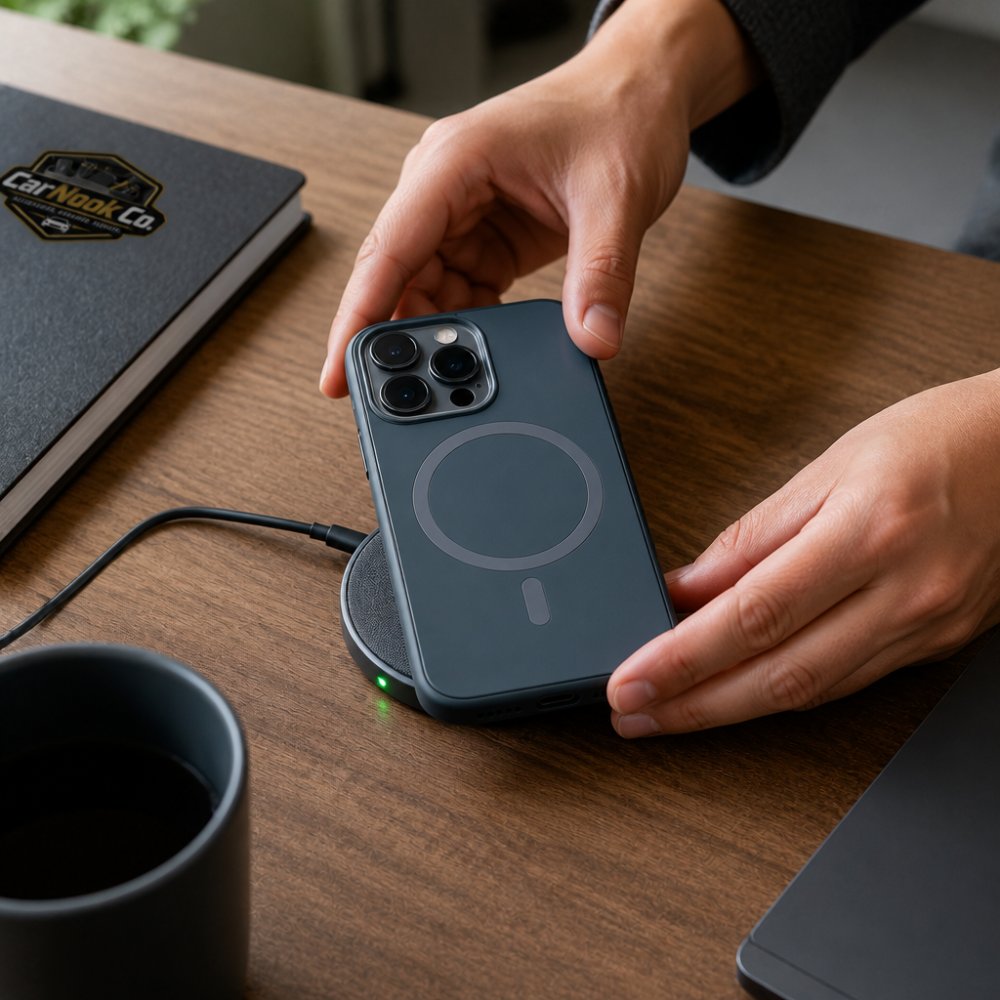
Close-up overhead shot of hands placing a phone in a slim MagSafe-compatible case onto a round magnetic charging pad on a wooden desk, with a small indicator light glowing
The fix is simple: use a case built for magnetic charging. CarNook Co. offers MagSafe-ready options like the CarNook™ DotWave MagSafe Phone Case, which includes a built-in magnetic ring so alignment and charging performance hold up. The CarNook™ RidgeMag Leather Phone Case does the same with a leather-style finish.


If you already own a case you like, the test is easy. Charge with the case on, then charge without it. If the phone charges noticeably faster bare, the case is the problem.
Heat, Thermal Management, and Battery Longevity
Heat is the real enemy of charging speed. Wireless charging generates more heat than a cable because energy is lost in the transfer between coils. When a phone gets warm, it deliberately slows charging to protect the battery. This is thermal management, and it is working as designed.
Battery longevity depends more on heat and charge cycles than on whether you use a cable or a pad. A phone that stays cool through a charge will accept power faster and age more gracefully. A phone that cooks on a misaligned pad will throttle, slow down, and run warmer than it should.
Practical habits that help:
- Remove thick cases during long charging sessions if the phone runs hot.
- Avoid charging in direct sun or on a hot dashboard.
- Keep the charging surface clear so heat can dissipate.
Real-World Charging Curves and Ambient Temperature
Ambient temperature quietly reshapes the charging curve. In a cool room, a phone holds higher wattage for longer. In a hot car on a summer day, the same phone may throttle within minutes. This is one of the angles most guides ignore, yet it explains why charging feels fast at home and sluggish on the road.
The charging curve itself follows a predictable shape. Power is highest when the battery is low, then tapers as it fills. The last stretch, from roughly 80 percent to full, is intentionally slow to reduce stress on the battery. Optimized charging features on modern phones lean into this by pausing or slowing near the top.
If a phone seems to charge slowly, the cause is often environmental rather than mechanical. Cool it down, align it properly, and the curve recovers.
Do Magnetic Car Mounts Damage Phone Batteries?
No. Magnetic car mounts do not damage phone batteries. The magnets in a mount or MagSafe accessory are not strong enough to harm the battery cells, and magnetic charging itself is a normal, supported function. Concerns about magnets wrecking a battery come from a misunderstanding of how these systems work.
What can affect battery health is heat, not magnetism. A mount that holds the phone in direct sunlight, or a charging setup that runs hot, will stress the battery far more than the magnet ever could. The magnet's job is alignment and grip, nothing more.
For drivers, this is good news. A secure magnetic mount keeps the phone steady for navigation without any risk to the battery. CarNook Co. carries magnetic and MagSafe accessories designed for exactly this use, from mounts to organizers that keep a car clean and uncluttered.
Best Practices for iPhone Wireless Charging
Best practices for iPhone wireless charging come down to alignment, power, and temperature. Get those three right and MagSafe will consistently outperform a loose Qi pad.
- Use a MagSafe-compatible case with a built-in magnetic ring
- Match the charger with an adapter that meets its wattage requirement
- Keep the phone centered so the coils stay aligned
- Charge in a cool spot, away from direct sun
- Remove the case if the phone runs hot during long sessions
- Expect the final 20 percent to charge slowly, by design
- Avoid stacking the phone on metal objects that interfere with the field
A MagSafe wallet or stand can double as a charging-friendly accessory. The CarNook™ MagWallet Phone Stand attaches magnetically and props the phone up for hands-free viewing, and the CarNook™ MagSafe Wallet Phone Case keeps cards and the phone together without breaking magnetic compatibility.

CarNook™ MagSafe Wallet Phone Case
For anyone building a cleaner setup, CarNook Co. focuses on accessories that make daily routines simpler, from MagSafe accessories to car phone mounts that hold a phone securely while it charges.
Charging speed is rarely about the charger alone. Alignment, adapter wattage, case thickness, and heat all shape how fast a phone actually fills, and MagSafe gives you control over the variables that matter most. CarNook Co. builds MagSafe-ready cases, magnetic mounts, and wallet stands designed to keep alignment precise and setups uncluttered, so a phone charges efficiently whether it sits on a desk or a dashboard. Explore the CarNook Co. collection and upgrade the accessories that make every charge count.
Frequently Asked Questions
Does MagSafe mess with wireless charging?
No. MagSafe uses the same Qi inductive charging standard, so it does not interfere with wireless charging. The built-in magnetic array simply aligns the charging coil in your phone with the coil in the pad, which cuts energy loss from misalignment. In practice, that means steadier power delivery rather than interference. If anything, MagSafe tends to make wireless charging more consistent because the phone snaps into the correct spot every time.
Does MagSafe increase charging speed?
It can, but charging speed depends on the iPhone, charger, power adapter, temperature, and alignment. MagSafe can provide faster wireless charging than basic Qi charging on compatible iPhones when the charger and power adapter support the required output. Proper magnetic alignment also helps reduce energy loss caused by poor coil positioning. A thick or incompatible case, excessive heat, or an underpowered adapter can reduce charging performance.
Can I use a non-MagSafe case with a MagSafe charger?
Yes, but performance can vary. Without a built-in magnetic ring, the phone may not align securely with the charger, which can reduce charging efficiency and generate additional heat. Thick cases, metal components, or incompatible case materials can also interfere with wireless charging. For the most reliable MagSafe connection and charging performance, use a MagSafe-compatible case with proper magnetic alignment.
Do magnetic car mounts damage phone batteries?
Magnets themselves do not damage modern phone batteries. Lithium-ion cells are not affected by static magnetic fields at the strength a car mount uses. The real risks are heat and misalignment: a mount that blocks airflow or forces the phone off-center on a charging pad can raise temperatures and slow charging. A well-ventilated magnetic mount that holds the phone securely can help minimize excess heat and misalignment, but normal battery aging will still occur over time.